class BLEUARTClient
BLEUARTClient class is a BLE UART client, which can connect to a BLE UART server and communicate with it.
Micropython Example:
 1# SPDX-FileCopyrightText: 2024 M5Stack Technology CO LTD
 2#
 3# SPDX-License-Identifier: MIT
 4
 5import os, sys, io
 6import M5
 7from M5 import *
 8from bleuart import *
 9import time
10
11
12ble_central = None
13
14
15nums = None
16i = None
17
18
19def setup():
20    global ble_central, nums, i
21
22    M5.begin()
23    ble_central = BLEUARTClient()
24    ble_central.connect("ble-uart", timeout=2000)
25    while not (ble_central.is_connected()):
26        time.sleep_ms(100)
27    print("Connected")
28    nums = [4, 8, 15, 16, 23, 46]
29    i = 1
30    while True:
31        ble_central.write((str((nums[int(i - 1)]))))
32        i = (i + 1) % len(nums)
33        time.sleep(1)
34        print((str("rx:") + str(((ble_central.read()).decode()))))
35    ble_central.close()
36    ble_central.deinit()
37
38
39def loop():
40    global ble_central, nums, i
41    M5.update()
42
43
44if __name__ == "__main__":
45    try:
46        setup()
47        while True:
48            loop()
49    except (Exception, KeyboardInterrupt) as e:
50        try:
51            from utility import print_error_msg
52
53            print_error_msg(e)
54        except ImportError:
55            print("please update to latest firmware")
UIFLOW2 Example:
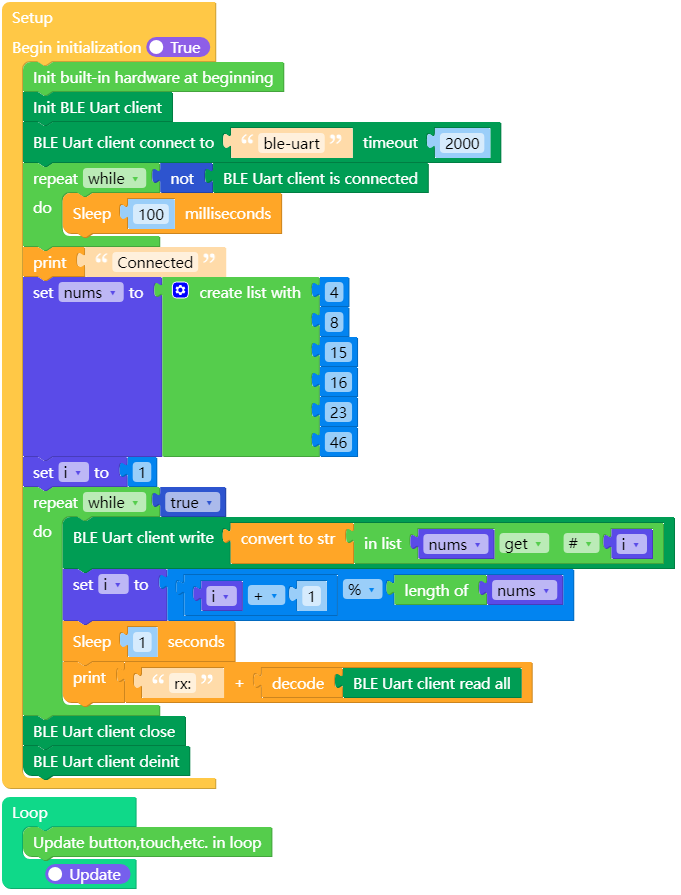
atoms3_bleuart_client_example.m5f2
Constructors

Methods
- BLEUARTClient.irq()
The irq of the ble uart client.
- BLEUARTClient.is_connected()
Check if the ble uart server is connected.
UIFLOW2:

- BLEUARTClient.connect(name, timeout=2000)
Connect to the ble uart server.
UIFLOW2:

- BLEUARTClient.any() int
Check if there is any data in the receive buffer.
- Returns:
The number of bytes in the receive buffer.
UIFLOW2:

- BLEUARTClient.read(sz=None) bytes
Read data from the receive buffer.
- Parameters:
sz (int) – The number of bytes to read. If not specified, read all data.
- Returns:
The data read from the receive buffer.
UIFLOW2:




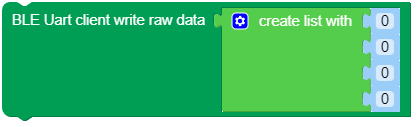
- BLEUARTClient.write(data: bytes)
Write data to the ble uart server.
- Parameters:
data (bytes) – The data to write.
UIFLOW2:





- BLEUARTClient.close()
Close the ble uart server.
UIFLOW2:

- BLEUARTClient.deinit()
Deinitialize the ble uart server.
UIFLOW2: