StamPLC IO
IOStamPLC controls the StamPLC IO extension board over I2C.
UiFlow2 Example
Voltage and current monitor
Open the stamplc_io_example.m5f2 project in UiFlow2.
This example sets the two output channels to PWM mode, then displays the voltage and current of channel 0 and channel 1.
UiFlow2 Code Block:
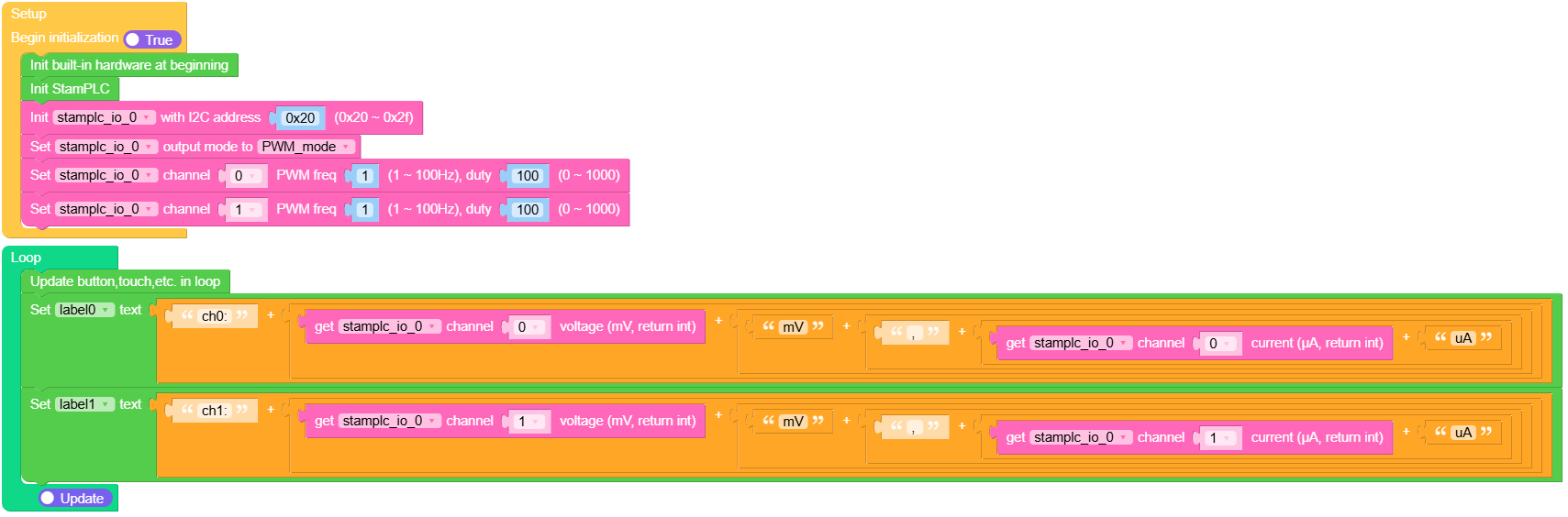
Example output:
None
MicroPython Example
Voltage and current monitor
This example sets the two output channels to PWM mode, then displays the voltage and current of channel 0 and channel 1.
MicroPython Code Block:
 1# SPDX-FileCopyrightText: 2026 M5Stack Technology CO LTD
 2#
 3# SPDX-License-Identifier: MIT
 4
 5import os, sys, io
 6import M5
 7from M5 import *
 8from stamplc import IOStamPLC
 9from stamplc import StamPLC
10
11
12title0 = None
13label0 = None
14label1 = None
15stamplc_0 = None
16stamplc_io_0 = None
17
18
19def setup():
20    global title0, label0, label1, stamplc_0, stamplc_io_0
21
22    M5.begin()
23    Widgets.fillScreen(0x000000)
24    title0 = Widgets.Title("StamPLC IO Example", 3, 0xFFFFFF, 0x0000FF, Widgets.FONTS.Montserrat18)
25    label0 = Widgets.Label("label0", 1, 42, 1.0, 0xFFFFFF, 0x222222, Widgets.FONTS.Montserrat18)
26    label1 = Widgets.Label("label1", 2, 71, 1.0, 0xFFFFFF, 0x222222, Widgets.FONTS.Montserrat18)
27
28    stamplc_0 = StamPLC()
29    stamplc_io_0 = IOStamPLC(address=0x20)
30    stamplc_io_0.set_output_mode(IOStamPLC.PWM_MODE)
31    stamplc_io_0.set_pwm_config(0, 1, 100)
32    stamplc_io_0.set_pwm_config(1, 1, 100)
33
34
35def loop():
36    global title0, label0, label1, stamplc_0, stamplc_io_0
37    M5.update()
38    label0.setText(
39        str(
40            (
41                str("ch0:")
42                + str(
43                    (
44                        str((stamplc_io_0.get_voltage(0)))
45                        + str(
46                            (
47                                str("mV")
48                                + str(
49                                    (
50                                        str(", ")
51                                        + str((str((stamplc_io_0.get_current(0))) + str("uA")))
52                                    )
53                                )
54                            )
55                        )
56                    )
57                )
58            )
59        )
60    )
61    label1.setText(
62        str(
63            (
64                str("ch1:")
65                + str(
66                    (
67                        str((stamplc_io_0.get_voltage(1)))
68                        + str(
69                            (
70                                str("mV")
71                                + str(
72                                    (
73                                        str(", ")
74                                        + str((str((stamplc_io_0.get_current(1))) + str("uA")))
75                                    )
76                                )
77                            )
78                        )
79                    )
80                )
81            )
82        )
83    )
84
85
86if __name__ == "__main__":
87    try:
88        setup()
89        while True:
90            loop()
91    except (Exception, KeyboardInterrupt) as e:
92        try:
93            from utility import print_error_msg
94
95            print_error_msg(e)
96        except ImportError:
97            print("please update to latest firmware")
Example output:
None
API
IOStamPLC
- class IOStamPLC(i2c=None, address=0x20)
Create a StamPLC IO extension object.
- Parameters:
i2c – I2C interface. If omitted, the shared StamPLC I2C bus is used.
address (int) – I2C address of the StamPLC IO extension.
UiFlow2 Code Block:

MicroPython Code Block:
from stamplc import IOStamPLC

io = IOStamPLC(address=0x20)
- get_voltage(channel)
Get the voltage of one channel.
UiFlow2 Code Block:

MicroPython Code Block:
voltage = io.get_voltage(0)
- get_current(channel)
Get the current of one channel.
UiFlow2 Code Block:

MicroPython Code Block:
current = io.get_current(0)
- get_io_control()
Get the IO control register value.
- Returns:
IO control register value.
- Return type:
- set_io_control(value)
Set the IO control register value.
- Parameters:
value (int) – IO control register value.
- set_solid_relay(channel, state)
Set the solid-state relay output of one channel.
- Parameters:
UiFlow2 Code Block:

MicroPython Code Block:
io.set_solid_relay(0, True)
- get_solid_relay(channel)
Get the solid-state relay output state of one channel.
UiFlow2 Code Block:

- set_ina226_pullup(channel, enable)
Enable or disable the INA226 pull-up of one channel.
- Parameters:
UiFlow2 Code Block:

- get_ina226_pullup(channel)
Get the INA226 pull-up state of one channel.
UiFlow2 Code Block:

- set_relay(state)
Set the onboard relay output.
- Parameters:
state (bool) –
Trueturns the relay on,Falseturns it off.
UiFlow2 Code Block:

- get_relay()
Get the onboard relay output state.
- Returns:
Relay state.
- Return type:
UiFlow2 Code Block:

- set_output_mode(mode)
Set the output mode.
- Parameters:
mode (int) –
IOStamPLC.OUTPUT_IO_MODEorIOStamPLC.PWM_MODE.
UiFlow2 Code Block:

MicroPython Code Block:
io.set_output_mode(IOStamPLC.PWM_MODE)
- get_output_mode()
Get the output mode.
- Returns:
IOStamPLC.OUTPUT_IO_MODEorIOStamPLC.PWM_MODE.- Return type:
UiFlow2 Code Block:

- set_ina226_config(channel, value)
Set the INA226 configuration register of one channel.
- get_ina226_config(channel)
Get the INA226 configuration register of one channel.
- set_pwm_config(channel, freq, duty)
Set the PWM frequency and duty of one channel.
- Parameters:
UiFlow2 Code Block:

MicroPython Code Block:
io.set_pwm_config(0, 1, 100)
- get_pwm_config(channel)
Get the PWM frequency and duty of one channel.
- get_firmware_version()
Get the firmware version.
- Returns:
Firmware version.
- Return type:
UiFlow2 Code Block:

MicroPython Code Block:
version = io.get_firmware_version()
- get_i2c_address()
Get the configured I2C address.
- Returns:
I2C address.
- Return type:
UiFlow2 Code Block:

MicroPython Code Block:
address = io.get_i2c_address()
- refresh_i2c_address()
Refresh the active I2C address from the device.