umqtt.default
umqtt.default rewrites the subscribe() method and supports ca file.
UiFlow2 Example
MQTT basic
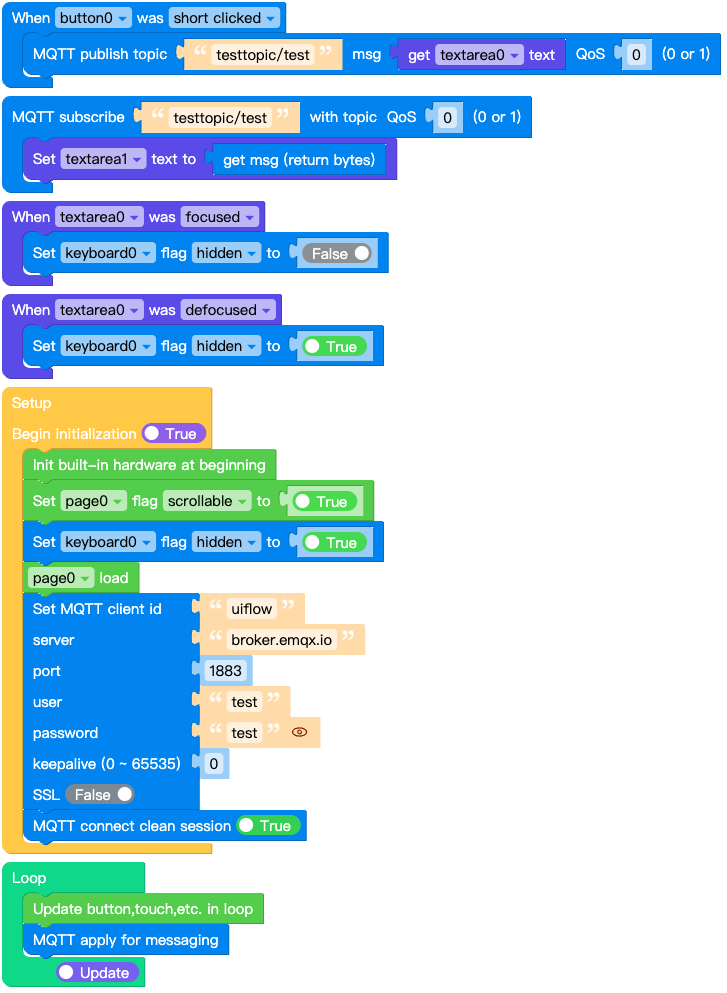
Open the cores3_mqtt_basic_example.m5f2 project in UiFlow2.
This example demonstrates how to connect to an MQTT broker.
UiFlow2 Code Block:
Example output:
None
MQTT over SSL
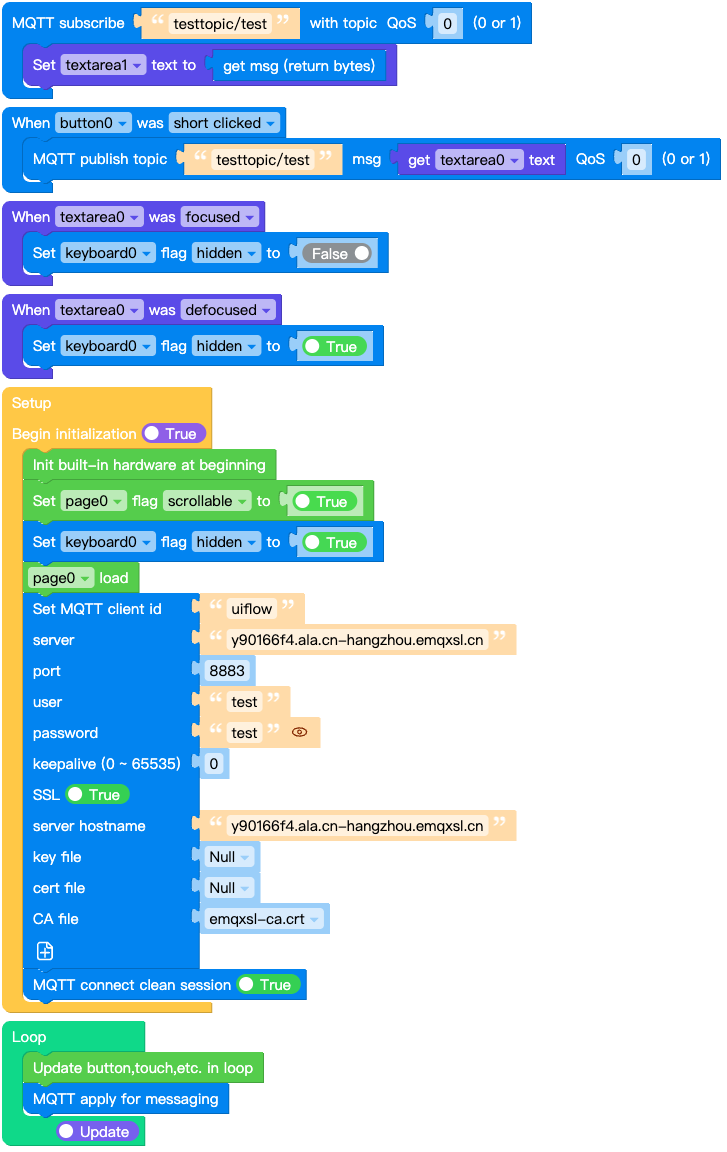
Open the cores3_mqtt_over_ssl_example.m5f2 project in UiFlow2.
This example demonstrates how to connect to an MQTT broker over SSL.
UiFlow2 Code Block:
Example output:
None
MicroPython Example
MQTT basic
This example demonstrates how to connect to an MQTT broker.
MicroPython Code Block:
# SPDX-FileCopyrightText: 2025 M5Stack Technology CO LTD
#
# SPDX-License-Identifier: MIT

import os, sys, io
import M5
from M5 import *
import m5ui
import lvgl as lv
from umqtt import MQTTClient


page0 = None
label0 = None
button0 = None
textarea0 = None
label1 = None
textarea1 = None
label2 = None
keyboard0 = None
mqtt_client = None


def button0_short_clicked_event(event_struct):
    global page0, label0, button0, textarea0, label1, textarea1, label2, keyboard0, mqtt_client
    mqtt_client.publish("testtopic/test", textarea0.get_text(), qos=0)


def mqtt_testtopic_test_event(data):
    global page0, label0, button0, textarea0, label1, textarea1, label2, keyboard0, mqtt_client
    textarea1.set_text(str(data[1]))


def textarea0_focused_event(event_struct):
    global page0, label0, button0, textarea0, label1, textarea1, label2, keyboard0, mqtt_client
    keyboard0.set_flag(lv.obj.FLAG.HIDDEN, False)


def textarea0_defocused_event(event_struct):
    global page0, label0, button0, textarea0, label1, textarea1, label2, keyboard0, mqtt_client
    keyboard0.set_flag(lv.obj.FLAG.HIDDEN, True)


def button0_event_handler(event_struct):
    global page0, label0, button0, textarea0, label1, textarea1, label2, keyboard0, mqtt_client
    event = event_struct.code
    if event == lv.EVENT.SHORT_CLICKED and True:
        button0_short_clicked_event(event_struct)
    return


def textarea0_event_handler(event_struct):
    global page0, label0, button0, textarea0, label1, textarea1, label2, keyboard0, mqtt_client
    event = event_struct.code
    if event == lv.EVENT.FOCUSED and True:
        textarea0_focused_event(event_struct)
    if event == lv.EVENT.DEFOCUSED and True:
        textarea0_defocused_event(event_struct)
    return


def setup():
    global page0, label0, button0, textarea0, label1, textarea1, label2, keyboard0, mqtt_client

    M5.begin()
    Widgets.setRotation(1)
    m5ui.init()
    page0 = m5ui.M5Page(bg_c=0xFFFFFF)
    textarea0 = m5ui.M5TextArea(
        text="textarea0",
        placeholder="Placeholder...",
        x=52,
        y=32,
        w=150,
        h=70,
        font=lv.font_montserrat_14,
        bg_c=0xFFFFFF,
        border_c=0xE0E0E0,
        text_c=0x212121,
        parent=page0,
    )
    textarea1 = m5ui.M5TextArea(
        text="textarea1",
        placeholder="Placeholder...",
        x=10,
        y=132,
        w=150,
        h=70,
        font=lv.font_montserrat_14,
        bg_c=0xFFFFFF,
        border_c=0xE0E0E0,
        text_c=0x212121,
        parent=page0,
    )
    label0 = m5ui.M5Label(
        "pubish topic: testtopic/test",
        x=10,
        y=10,
        text_c=0x000000,
        bg_c=0xFFFFFF,
        bg_opa=0,
        font=lv.font_montserrat_14,
        parent=page0,
    )
    button0 = m5ui.M5Button(
        text="publish",
        x=217,
        y=32,
        bg_c=0x2196F3,
        text_c=0xFFFFFF,
        font=lv.font_montserrat_14,
        parent=page0,
    )
    label1 = m5ui.M5Label(
        "subscribe topic: testtopic/test",
        x=11,
        y=110,
        text_c=0x000000,
        bg_c=0xFFFFFF,
        bg_opa=0,
        font=lv.font_montserrat_14,
        parent=page0,
    )
    label2 = m5ui.M5Label(
        "msg:",
        x=10,
        y=32,
        text_c=0x000000,
        bg_c=0xFFFFFF,
        bg_opa=0,
        font=lv.font_montserrat_14,
        parent=page0,
    )
    keyboard0 = m5ui.M5Keyboard(
        x=0,
        y=120,
        w=320,
        h=120,
        mode=lv.keyboard.MODE.TEXT_LOWER,
        target_textarea=textarea0,
        parent=page0,
    )

    button0.add_event_cb(button0_event_handler, lv.EVENT.ALL, None)
    textarea0.add_event_cb(textarea0_event_handler, lv.EVENT.ALL, None)

    page0.set_flag(lv.obj.FLAG.SCROLLABLE, True)
    keyboard0.set_flag(lv.obj.FLAG.HIDDEN, True)
    page0.screen_load()
    mqtt_client = MQTTClient(
        "uiflow", "broker.emqx.io", port=1883, user="test", password="test", keepalive=0
    )
    mqtt_client.connect(clean_session=True)
    mqtt_client.subscribe("testtopic/test", mqtt_testtopic_test_event, qos=0)


def loop():
    global page0, label0, button0, textarea0, label1, textarea1, label2, keyboard0, mqtt_client
    M5.update()
    mqtt_client.check_msg()


if __name__ == "__main__":
    try:
        setup()
        while True:
            loop()
    except (Exception, KeyboardInterrupt) as e:
        try:
            m5ui.deinit()
            from utility import print_error_msg

            print_error_msg(e)
        except ImportError:
            print("please update to latest firmware")
Example output:
None
MQTT over SSL
This example demonstrates how to connect to an MQTT broker over SSL.
MicroPython Code Block:
  1# SPDX-FileCopyrightText: 2024 M5Stack Technology CO LTD
  2#
  3# SPDX-License-Identifier: MIT
  4
  5import os, sys, io
  6import M5
  7from M5 import *
  8import m5ui
  9import lvgl as lv
 10from umqtt import MQTTClient
 11
 12
 13page0 = None
 14label0 = None
 15button0 = None
 16textarea0 = None
 17label1 = None
 18textarea1 = None
 19label2 = None
 20keyboard0 = None
 21mqtt_client = None
 22
 23
 24def button0_short_clicked_event(event_struct):
 25    global page0, label0, button0, textarea0, label1, textarea1, label2, keyboard0, mqtt_client
 26    mqtt_client.publish("testtopic/test", textarea0.get_text(), qos=0)
 27
 28
 29def mqtt_testtopic_test_event(data):
 30    global page0, label0, button0, textarea0, label1, textarea1, label2, keyboard0, mqtt_client
 31    textarea1.set_text(str(data[1]))
 32
 33
 34def textarea0_focused_event(event_struct):
 35    global page0, label0, button0, textarea0, label1, textarea1, label2, keyboard0, mqtt_client
 36    keyboard0.set_flag(lv.obj.FLAG.HIDDEN, False)
 37
 38
 39def textarea0_defocused_event(event_struct):
 40    global page0, label0, button0, textarea0, label1, textarea1, label2, keyboard0, mqtt_client
 41    keyboard0.set_flag(lv.obj.FLAG.HIDDEN, True)
 42
 43
 44def button0_event_handler(event_struct):
 45    global page0, label0, button0, textarea0, label1, textarea1, label2, keyboard0, mqtt_client
 46    event = event_struct.code
 47    if event == lv.EVENT.SHORT_CLICKED and True:
 48        button0_short_clicked_event(event_struct)
 49    return
 50
 51
 52def textarea0_event_handler(event_struct):
 53    global page0, label0, button0, textarea0, label1, textarea1, label2, keyboard0, mqtt_client
 54    event = event_struct.code
 55    if event == lv.EVENT.FOCUSED and True:
 56        textarea0_focused_event(event_struct)
 57    if event == lv.EVENT.DEFOCUSED and True:
 58        textarea0_defocused_event(event_struct)
 59    return
 60
 61
 62def setup():
 63    global page0, label0, button0, textarea0, label1, textarea1, label2, keyboard0, mqtt_client
 64
 65    M5.begin()
 66    Widgets.setRotation(1)
 67    m5ui.init()
 68    page0 = m5ui.M5Page(bg_c=0xFFFFFF)
 69    textarea0 = m5ui.M5TextArea(
 70        text="textarea0",
 71        placeholder="Placeholder...",
 72        x=52,
 73        y=32,
 74        w=150,
 75        h=70,
 76        font=lv.font_montserrat_14,
 77        bg_c=0xFFFFFF,
 78        border_c=0xE0E0E0,
 79        text_c=0x212121,
 80        parent=page0,
 81    )
 82    textarea1 = m5ui.M5TextArea(
 83        text="textarea1",
 84        placeholder="Placeholder...",
 85        x=10,
 86        y=132,
 87        w=150,
 88        h=70,
 89        font=lv.font_montserrat_14,
 90        bg_c=0xFFFFFF,
 91        border_c=0xE0E0E0,
 92        text_c=0x212121,
 93        parent=page0,
 94    )
 95    label0 = m5ui.M5Label(
 96        "pubish topic: testtopic/test",
 97        x=10,
 98        y=10,
 99        text_c=0x000000,
100        bg_c=0xFFFFFF,
101        bg_opa=0,
102        font=lv.font_montserrat_14,
103        parent=page0,
104    )
105    button0 = m5ui.M5Button(
106        text="publish",
107        x=217,
108        y=32,
109        bg_c=0x2196F3,
110        text_c=0xFFFFFF,
111        font=lv.font_montserrat_14,
112        parent=page0,
113    )
114    label1 = m5ui.M5Label(
115        "subscribe topic: testtopic/test",
116        x=11,
117        y=110,
118        text_c=0x000000,
119        bg_c=0xFFFFFF,
120        bg_opa=0,
121        font=lv.font_montserrat_14,
122        parent=page0,
123    )
124    label2 = m5ui.M5Label(
125        "msg:",
126        x=10,
127        y=32,
128        text_c=0x000000,
129        bg_c=0xFFFFFF,
130        bg_opa=0,
131        font=lv.font_montserrat_14,
132        parent=page0,
133    )
134    keyboard0 = m5ui.M5Keyboard(
135        x=0,
136        y=120,
137        w=320,
138        h=120,
139        mode=lv.keyboard.MODE.TEXT_LOWER,
140        target_textarea=textarea0,
141        parent=page0,
142    )
143
144    button0.add_event_cb(button0_event_handler, lv.EVENT.ALL, None)
145    textarea0.add_event_cb(textarea0_event_handler, lv.EVENT.ALL, None)
146
147    page0.set_flag(lv.obj.FLAG.SCROLLABLE, True)
148    keyboard0.set_flag(lv.obj.FLAG.HIDDEN, True)
149    page0.screen_load()
150    mqtt_client = MQTTClient(
151        "uiflow",
152        "y90166f4.ala.cn-hangzhou.emqxsl.cn",
153        port=8883,
154        user="test",
155        password="test",
156        keepalive=0,
157        ssl=True,
158        ssl_params={
159            "cafile": "/flash/certificate/emqxsl-ca.crt",
160            "server_hostname": "y90166f4.ala.cn-hangzhou.emqxsl.cn",
161        },
162    )
163    mqtt_client.connect(clean_session=True)
164    mqtt_client.subscribe("testtopic/test", mqtt_testtopic_test_event, qos=0)
165
166
167def loop():
168    global page0, label0, button0, textarea0, label1, textarea1, label2, keyboard0, mqtt_client
169    M5.update()
170    mqtt_client.check_msg()
171
172
173if __name__ == "__main__":
174    try:
175        setup()
176        while True:
177            loop()
178    except (Exception, KeyboardInterrupt) as e:
179        try:
180            m5ui.deinit()
181            from utility import print_error_msg
182
183            print_error_msg(e)
184        except ImportError:
185            print("please update to latest firmware")
Example output:
None
API
MQTTClient
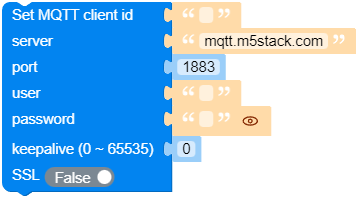
- class umqtt.MQTTClient(client_id, server, port=0, user=None, password=None, keepalive=0, ssl=False, ssl_params={})
Create an MQTTClient object.
- Parameters:
client_id (str) – the unique client id string used when connecting to the broker.
server (str) – the hostname or IP address of the remote broker.
port (int) – the network port of the server host to connect to.
user (str or None) – a username for broker authentication.
password (str or None) – a password for broker authentication.
keepalive (int) – maximum period in seconds allowed between communications with the broker. If no other messages are being exchanged, this controls the rate at which the client will send ping messages to the broker.
ssl (bool) – Whether to use ssl.
ssl_params (dict) – Some parameters required to initiate an ssl connection.
- Returns:
MQTTClient object
- Return type:
UiFlow2 Code Block:

MicroPython Code Block:
from umqtt import MQTTClient

mqtt_client = MQTTClient(
    'uf2',
    'y90166f4.ala.cn-hangzhou.emqxsl.cn',
    port=8883,
    user='test',
    password='test',
    keepalive=0,
    ssl=True,
    ssl_params={
        "server_hostname":'y90166f4.ala.cn-hangzhou.emqxsl.cn',
        "key": "/flash/certificate/emqxsl-ca.crt", # 私钥文件,双向认证的时候使用
        "cert": "/flash/certificate/emqxsl-ca.crt", # 客户端证书文件,双向认证的时候使用
        "cafile": "/flash/certificate/emqxsl-ca.crt", # CA证书,单向认证的时候使用
    }
)
- connect(clean_session=True) bool
Connect to a server. Returns True if this connection uses persisten session stored on a server (this will be always False if clean_session=True argument is used (default)).
UiFlow2 Code Block:

MicroPython Code Block:
mqtt_client.connect(clean_session=True)
- disconnect() None
Disconnect from a server, release resources.
UiFlow2 Code Block:

MicroPython Code Block:
mqtt_client.disconnect()
- reconnect() None
Disconnect from a server, release resources.
UiFlow2 Code Block:

MicroPython Code Block:
mqtt_client.reconnect()
- ping() None
Ping server (response is processed automatically by
wait_msg()).MicroPython Code Block:
mqtt_client.ping()
- publish(topic, msg, retain=False, qos=0) None
Publish a message.
- Parameters:
topic (str or bytes or bytearray) – the topic that the message should be published on.
msg (str or bytes or bytearray) – the message to send as a will.
retain (bool) – if set to True, the will message will be set as the “last will”/retained message for the topic.
qos (int) – the quality of service level to use
UiFlow2 Code Block:

MicroPython Code Block:
mqtt_client.publish(topic, msg, retain=False, qos=0)
- subscribe(topic, handler, qos=0) None
Subscribe to a topic.
- Parameters:
topic (str or bytes or bytearray) – a string specifying the subscription topic to subscribe to.
handler (function) – called when a message has been received on a topic that the client subscribes to and the message does match an existing topic filter callback.
qos (int) – the desired quality of service level for the subscription. Defaults to 0.
UiFlow2 Code Block:

An handler showing a message has been received:
def on_sub_cb(data):
    print("topic:", data[0])
    print("msg:", data[1])
On uiflow2, you can get the topic and message of the current handler through
 and
and  .
.
- unsubscribe(topic) None
Unsubscribe from a topic.
- Parameters:
topic (str or bytes or bytearray) – a string specifying the subscription topic to unsubscribe from.
UiFlow2 Code Block:

MicroPython Code Block:
mqtt_client.unsubscribe(topic)
- set_last_will(topic, msg, retain=False, qos=0) None
Important
Should be called before
connect().Set MQTT “last will” message.
- Parameters:
topic (str or bytes or bytearray) – the topic that the will message should be published on.
msg (str or bytes or bytearray) – the message to send as a will. If not given, or set to None a zero length message will be used as the will.
retain (bool) – if set to True, the will message will be set as the “last will”/retained message for the topic.
qos (int) – the quality of service level to use for the will.
UiFlow2 Code Block:

MicroPython Code Block:
mqtt_client.set_last_will()
- wait_msg() None
Important
wait_msg()andcheck_msg()are “main loop iteration” methods, blocking and non-blocking version. They should be called periodically in a loop,wait_msg()if you don’t have any other foreground tasks to perform (i.e. your app just reacts to subscribed MQTT messages),check_msg()if you process other foreground tasks too.Note that you don’t need to call
wait_msg()/check_msg()if you only publish messages, never subscribe to them.Wait for a server message.
MicroPython Code Block:
mqtt_client.wait_msg()
- check_msg(attempts=2) None
Check if there’s pending message from server. If yes, process the same way as
wait_msg(), if not, return immediately.UiFlow2 Code Block:

MicroPython Code Block:
mqtt_client.check_msg()