EasyUDPServer
EasyUDPServer and EasyUDPClientSocket provide a simple way to create UDP servers and manage client connections in an event-driven manner.
UiFlow2 Example
simple server
Open the udp_server_core2_example.m5f2 project in UiFlow2.
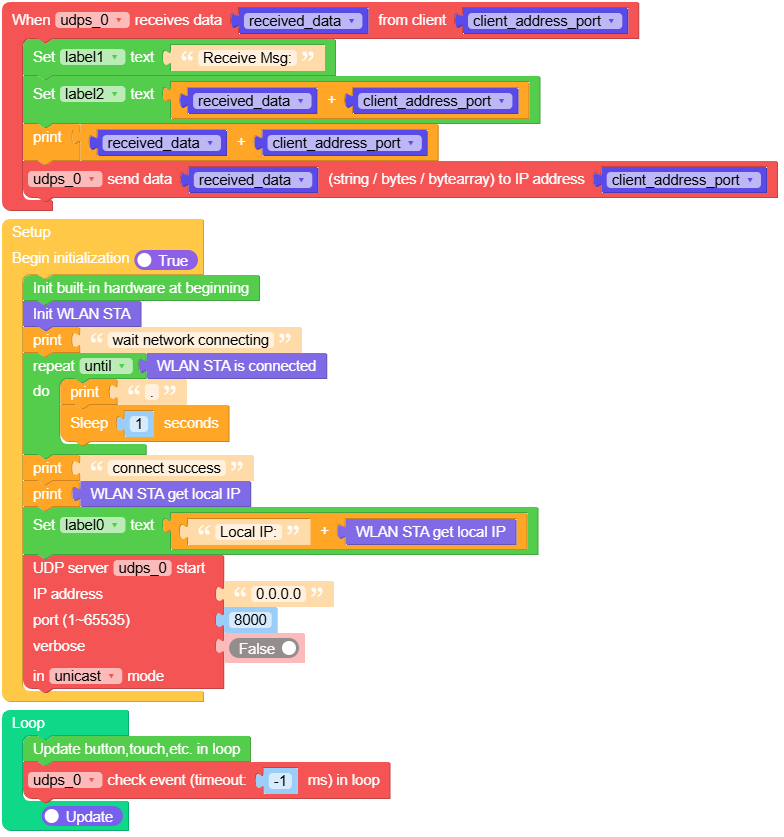
This example creates a UDP server that listens on port 8000 and displays the received data on the screen.
UiFlow2 Code Block:
Example output:
None
MicroPython Example
simple server
This example creates a UDP server that listens on port 8000 and displays the received data on the screen.
MicroPython Code Block:
 1# SPDX-FileCopyrightText: 2026 M5Stack Technology CO LTD
 2#
 3# SPDX-License-Identifier: MIT
 4
 5import os, sys, io
 6import M5
 7from M5 import *
 8from easysocket import EasyUDPServer
 9import network
10import time
11
12
13title0 = None
14label2 = None
15label0 = None
16label1 = None
17wlan_sta = None
18udps_0 = None
19
20
21received_data = None
22client_address_port = None
23
24
25def udps_0_received_event(args):
26    global title0, label2, label0, label1, wlan_sta, udps_0, received_data, client_address_port
27    server, client_address_port, received_data = args
28    label1.setText(str("Receive Msg:"))
29    label2.setText(str((str(received_data) + str(client_address_port))))
30    print((str(received_data) + str(client_address_port)))
31    udps_0.sendto(received_data, client_address_port)
32
33
34def setup():
35    global title0, label2, label0, label1, wlan_sta, udps_0, received_data, client_address_port
36
37    M5.begin()
38    Widgets.setRotation(1)
39    Widgets.fillScreen(0x222222)
40    title0 = Widgets.Title(
41        "UDPServer Core2 Example", 3, 0xFFFFFF, 0x0000FF, Widgets.FONTS.DejaVu18
42    )
43    label2 = Widgets.Label("", 1, 146, 1.0, 0xFFFFFF, 0x222222, Widgets.FONTS.DejaVu18)
44    label0 = Widgets.Label("Local IP:", 2, 68, 1.0, 0xFFFFFF, 0x222222, Widgets.FONTS.DejaVu18)
45    label1 = Widgets.Label("Receive Msg:", 2, 109, 1.0, 0xFFFFFF, 0x222222, Widgets.FONTS.DejaVu18)
46
47    wlan_sta = network.WLAN(network.STA_IF)
48    print("wait network connecting")
49    while not (wlan_sta.isconnected()):
50        print(".")
51        time.sleep(1)
52    print("connect success")
53    print(wlan_sta.ifconfig()[0])
54    label0.setText(str((str("Local IP:") + str((wlan_sta.ifconfig()[0])))))
55    udps_0 = EasyUDPServer(
56        host="0.0.0.0",
57        port=8000,
58        mode=EasyUDPServer.MODE_UNICAST,
59        multicast_group=None,
60        verbose=False,
61    )
62    udps_0.on_data_received(udps_0_received_event)
63
64
65def loop():
66    global title0, label2, label0, label1, wlan_sta, udps_0, received_data, client_address_port
67    M5.update()
68    udps_0.check_event(timeout=-1)
69
70
71if __name__ == "__main__":
72    try:
73        setup()
74        while True:
75            loop()
76    except (Exception, KeyboardInterrupt) as e:
77        try:
78            from utility import print_error_msg
79
80            print_error_msg(e)
81        except ImportError:
82            print("please update to latest firmware")
Example output:
None
API
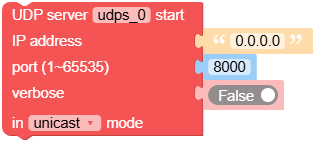
- class software.easysocket.udp_server.EasyUDPServer(host='0.0.0.0', port=8000, mode=0, multicast_group=None, verbose=False)
Bases:
objectCreate an EasyUDPServer object.
- Parameters:
Note
start service automatically when initialized.
Note
This class is non-blocking and event-driven. You need to call check_event() periodically to process events.
UiFlow2 Code Block:
MicroPython Code Block:
from easysocket import EasyUDPServer

udp_server = EasyUDPServer(host="0.0.0.0", port=8080)
- start()
Start the server.
MicroPython Code Block:
udp_server.start()
- stop()
Stop the server.
MicroPython Code Block:
udp_server.stop()
- on_data_received(callback)
Set the callback function for data received event.
- Parameters:
callback – The callback function.
UiFlow2 Code Block:

MicroPython Code Block:
def on_data_received_cb(args):
    client, address, data = args
    print("Received:", data, "from", address)

udp_server.on_data_received(on_data_received_cb)

