HAT 18650C
HAT 18650C V1.1 integrates an AW32257 charger and an INA226 power monitor. It can measure battery voltage, current, and power, control battery charging, set charge current, read charge status/fault status, and control the AW32257 Boost/OTG output.
Support the following products:

Note
With the current hardware direction, charging current is usually negative and discharging current is usually positive. Charge current and voltage settings are written through AW32257 register steps, so the actual value is mapped to a supported gear rather than an arbitrary value.
UiFlow2 Example
Charge Test
Open the sticks3_hat18650c_charge_example.m5f2 project in UiFlow2.
This example reads battery voltage and current, shows charging state, and controls Charge ON/OFF with the button on StickS3.
UiFlow2 Code Block:
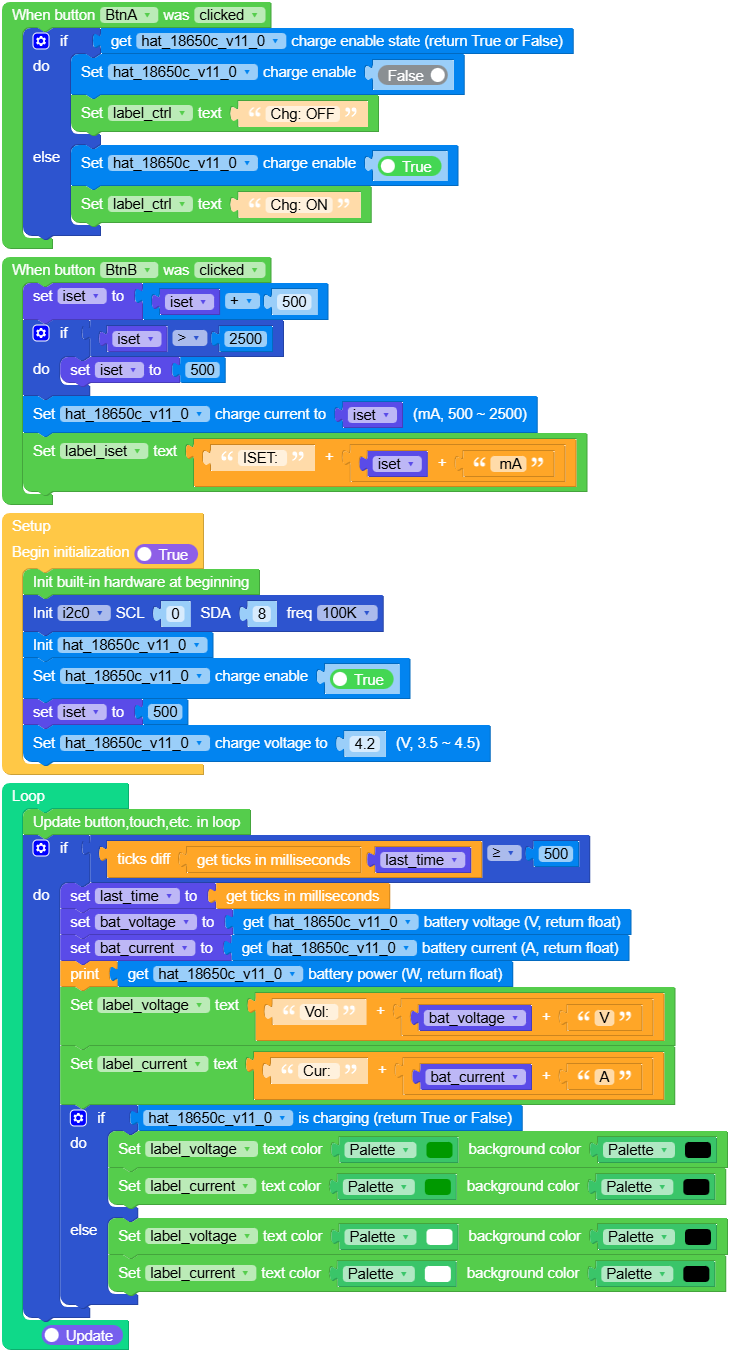
Example output:
None
Output Test
Open the sticks3_hat18650c_output_example.m5f2 project in UiFlow2.
This example reads battery voltage and current, shows OTG output state, and controls OTG Output ON/OFF with the button on StickS3.
UiFlow2 Code Block:
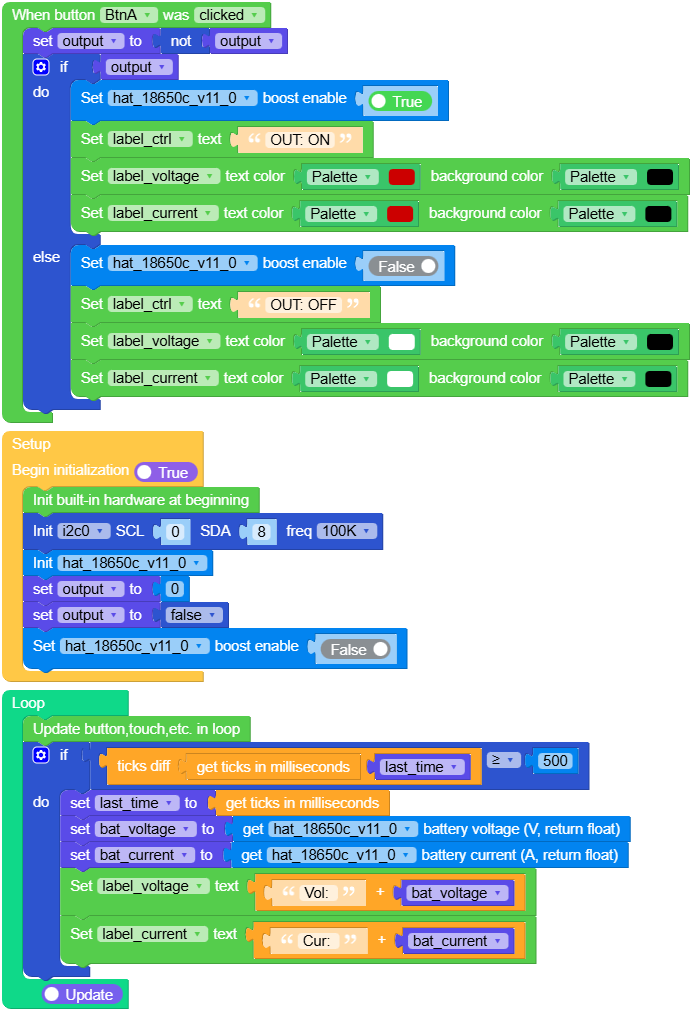
Example output:
None
MicroPython Example
Charge Test
Read battery voltage and current, show charging state, and control Charge ON/OFF with the button on StickS3.
MicroPython Code Block:
  1# SPDX-FileCopyrightText: 2024 M5Stack Technology CO LTD
  2#
  3# SPDX-License-Identifier: MIT
  4
  5import os, sys, io
  6import M5
  7from M5 import *
  8from hat import HAT18650CHat
  9from hardware import Pin
 10from hardware import I2C
 11import time
 12
 13
 14label_title = None
 15label_voltage = None
 16label_current = None
 17label_iset = None
 18label_ctrl = None
 19i2c0 = None
 20hat_18650c_v11_0 = None
 21
 22
 23iset = None
 24last_time = None
 25bat_voltage = None
 26bat_current = None
 27
 28
 29def btna_was_clicked_event(state):
 30    global \
 31        label_title, \
 32        label_voltage, \
 33        label_current, \
 34        label_iset, \
 35        label_ctrl, \
 36        i2c0, \
 37        hat_18650c_v11_0, \
 38        iset, \
 39        last_time, \
 40        bat_voltage, \
 41        bat_current
 42    if hat_18650c_v11_0.get_charge_enable():
 43        hat_18650c_v11_0.set_charge_enable(False)
 44        label_ctrl.setText(str("Chg: OFF"))
 45    else:
 46        hat_18650c_v11_0.set_charge_enable(True)
 47        label_ctrl.setText(str("Chg: ON"))
 48
 49
 50def btnb_was_clicked_event(state):
 51    global \
 52        label_title, \
 53        label_voltage, \
 54        label_current, \
 55        label_iset, \
 56        label_ctrl, \
 57        i2c0, \
 58        hat_18650c_v11_0, \
 59        iset, \
 60        last_time, \
 61        bat_voltage, \
 62        bat_current
 63    iset = iset + 500
 64    if iset > 2500:
 65        iset = 500
 66    hat_18650c_v11_0.set_charge_current(iset)
 67    label_iset.setText(str((str("ISET: ") + str((str(iset) + str(" mA"))))))
 68
 69
 70def setup():
 71    global \
 72        label_title, \
 73        label_voltage, \
 74        label_current, \
 75        label_iset, \
 76        label_ctrl, \
 77        i2c0, \
 78        hat_18650c_v11_0, \
 79        iset, \
 80        last_time, \
 81        bat_voltage, \
 82        bat_current
 83
 84    M5.begin()
 85    Widgets.setRotation(0)
 86    Widgets.fillScreen(0x000000)
 87    label_title = Widgets.Label(
 88        "Charge", 22, 5, 1.0, 0x17EE6A, 0x000000, Widgets.FONTS.Montserrat24
 89    )
 90    label_voltage = Widgets.Label(
 91        "Vol:", 7, 45, 1.0, 0xFFFFFF, 0x000000, Widgets.FONTS.Montserrat18
 92    )
 93    label_current = Widgets.Label(
 94        "Cur:", 3, 70, 1.0, 0xFFFFFF, 0x000000, Widgets.FONTS.Montserrat18
 95    )
 96    label_iset = Widgets.Label(
 97        "ISET: 500mA", 3, 179, 1.0, 0xFFFFFF, 0x000000, Widgets.FONTS.Montserrat18
 98    )
 99    label_ctrl = Widgets.Label(
100        "CHG: ON", 26, 214, 1.0, 0xFFFFFF, 0x000000, Widgets.FONTS.Montserrat18
101    )
102
103    BtnA.setCallback(type=BtnA.CB_TYPE.WAS_CLICKED, cb=btna_was_clicked_event)
104    BtnB.setCallback(type=BtnB.CB_TYPE.WAS_CLICKED, cb=btnb_was_clicked_event)
105
106    i2c0 = I2C(0, scl=Pin(0), sda=Pin(8), freq=100000)
107    hat_18650c_v11_0 = HAT18650CHat(i2c0)
108    hat_18650c_v11_0.set_charge_enable(True)
109    iset = 500
110    hat_18650c_v11_0.set_charge_voltage(4.2)
111
112
113def loop():
114    global \
115        label_title, \
116        label_voltage, \
117        label_current, \
118        label_iset, \
119        label_ctrl, \
120        i2c0, \
121        hat_18650c_v11_0, \
122        iset, \
123        last_time, \
124        bat_voltage, \
125        bat_current
126    M5.update()
127    if (time.ticks_diff((time.ticks_ms()), last_time)) >= 500:
128        last_time = time.ticks_ms()
129        bat_voltage = hat_18650c_v11_0.get_battery_voltage()
130        bat_current = hat_18650c_v11_0.get_battery_current()
131        print(hat_18650c_v11_0.get_battery_power())
132        label_voltage.setText(str((str("Vol: ") + str((str(bat_voltage) + str("V"))))))
133        label_current.setText(str((str("Cur: ") + str((str(bat_current) + str("A"))))))
134        if hat_18650c_v11_0.is_charging():
135            label_voltage.setColor(0x009900, 0x000000)
136            label_current.setColor(0x009900, 0x000000)
137        else:
138            label_voltage.setColor(0xFFFFFF, 0x000000)
139            label_current.setColor(0xFFFFFF, 0x000000)
140
141
142if __name__ == "__main__":
143    try:
144        setup()
145        while True:
146            loop()
147    except (Exception, KeyboardInterrupt) as e:
148        try:
149            from utility import print_error_msg
150
151            print_error_msg(e)
152        except ImportError:
153            print("please update to latest firmware")
Example output:
None
Output Test
Read battery voltage and current, show OTG output state, and control OTG Output ON/OFF with the button on StickS3.
MicroPython Code Block:
  1# SPDX-FileCopyrightText: 2024 M5Stack Technology CO LTD
  2#
  3# SPDX-License-Identifier: MIT
  4
  5import os, sys, io
  6import M5
  7from M5 import *
  8from hardware import Pin
  9from hardware import I2C
 10from hat import HAT18650CHat
 11import time
 12
 13
 14label_title = None
 15label_voltage = None
 16label_current = None
 17label_ctrl = None
 18i2c0 = None
 19hat_18650c_v11_0 = None
 20
 21
 22output = None
 23last_time = None
 24bat_voltage = None
 25bat_current = None
 26
 27
 28def btna_was_clicked_event(state):
 29    global \
 30        label_title, \
 31        label_voltage, \
 32        label_current, \
 33        label_ctrl, \
 34        i2c0, \
 35        hat_18650c_v11_0, \
 36        output, \
 37        last_time, \
 38        bat_voltage, \
 39        bat_current
 40    output = not output
 41    if output:
 42        hat_18650c_v11_0.set_boost_enable(True)
 43        label_ctrl.setText(str("OUT: ON"))
 44        label_voltage.setColor(0xCC0000, 0x000000)
 45        label_current.setColor(0xCC0000, 0x000000)
 46    else:
 47        hat_18650c_v11_0.set_boost_enable(False)
 48        label_ctrl.setText(str("OUT: OFF"))
 49        label_voltage.setColor(0xFFFFFF, 0x000000)
 50        label_current.setColor(0xFFFFFF, 0x000000)
 51
 52
 53def setup():
 54    global \
 55        label_title, \
 56        label_voltage, \
 57        label_current, \
 58        label_ctrl, \
 59        i2c0, \
 60        hat_18650c_v11_0, \
 61        output, \
 62        last_time, \
 63        bat_voltage, \
 64        bat_current
 65
 66    M5.begin()
 67    Widgets.setRotation(0)
 68    Widgets.fillScreen(0x000000)
 69    label_title = Widgets.Label(
 70        "OUTPUT", 28, 5, 1.0, 0x17EE6A, 0x000000, Widgets.FONTS.Montserrat18
 71    )
 72    label_voltage = Widgets.Label(
 73        "Vol:", 7, 45, 1.0, 0xFFFFFF, 0x000000, Widgets.FONTS.Montserrat18
 74    )
 75    label_current = Widgets.Label(
 76        "Cur:", 3, 70, 1.0, 0xFFFFFF, 0x000000, Widgets.FONTS.Montserrat18
 77    )
 78    label_ctrl = Widgets.Label(
 79        "OUT: OFF", 23, 205, 1.0, 0xFFFFFF, 0x000000, Widgets.FONTS.Montserrat18
 80    )
 81
 82    BtnA.setCallback(type=BtnA.CB_TYPE.WAS_CLICKED, cb=btna_was_clicked_event)
 83
 84    i2c0 = I2C(0, scl=Pin(0), sda=Pin(8), freq=100000)
 85    hat_18650c_v11_0 = HAT18650CHat(i2c0)
 86    output = 0
 87    output = False
 88    hat_18650c_v11_0.set_boost_enable(False)
 89
 90
 91def loop():
 92    global \
 93        label_title, \
 94        label_voltage, \
 95        label_current, \
 96        label_ctrl, \
 97        i2c0, \
 98        hat_18650c_v11_0, \
 99        output, \
100        last_time, \
101        bat_voltage, \
102        bat_current
103    M5.update()
104    if (time.ticks_diff((time.ticks_ms()), last_time)) >= 500:
105        last_time = time.ticks_ms()
106        bat_voltage = hat_18650c_v11_0.get_battery_voltage()
107        bat_current = hat_18650c_v11_0.get_battery_current()
108        label_voltage.setText(str((str("Vol: ") + str(bat_voltage))))
109        label_current.setText(str((str("Cur: ") + str(bat_current))))
110
111
112if __name__ == "__main__":
113    try:
114        setup()
115        while True:
116            loop()
117    except (Exception, KeyboardInterrupt) as e:
118        try:
119            from utility import print_error_msg
120
121            print_error_msg(e)
122        except ImportError:
123            print("please update to latest firmware")
Example output:
None
API
HAT18650CHat
- class hat.hat18650c.HAT18650CHat(i2c, charger_address=micropython.const, monitor_address=micropython.const, shunt_resistor=0.01, max_expected_current=10)
Bases:
objectCreate a HAT18650CHat object.
The AW32257 controls battery charging and Boost/OTG output. The INA226 measures battery bus voltage, current, and power.
- Parameters:
i2c (I2C) – I2C bus.
charger_address (int) – AW32257 I2C address. Default is 0x6A.
monitor_address (int) – INA226 I2C address. Default is 0x41.
shunt_resistor (float) – INA226 shunt resistor value in ohms. Default is 0.01.
max_expected_current (float) – Maximum expected current for INA226 calibration in amps. Default is 10.
UiFlow2 Code Block:

MicroPython Code Block:
from hardware import I2C, Pin
from hat import HAT18650CHat

i2c0 = I2C(0, scl=Pin(0), sda=Pin(8), freq=100000)
hat18650c = HAT18650CHat(i2c0)
- set_charge_enable(enable)
Enable or disable battery charging.
- Parameters:
enable (bool) – True to enable charging, False to disable charging.
- Return type:
None
UiFlow2 Code Block:

MicroPython Code Block:
hat18650c.set_charge_enable(True)
hat18650c.set_charge_enable(False)
- get_charge_enable()
Get battery charging enable state.
- Returns:
True if charging is enabled, False otherwise.
- Return type:
UiFlow2 Code Block:

MicroPython Code Block:
charge_enable = hat18650c.get_charge_enable()
- set_charge_current(current_ma)
Set fast-charge current.
The target current is clamped to the HAT 18650C supported table. The closest supported table value not greater than the target is used internally, so the written value may be lower than the requested value.
- Parameters:
current_ma (int) – Target charge current in mA.
- Return type:
None
UiFlow2 Code Block:

MicroPython Code Block:
hat18650c.set_charge_current(1000)
- get_charge_current()
Get fast-charge current setting.
Returns the actual selected current-table value.
- Returns:
Charge current setting in mA.
- Return type:
UiFlow2 Code Block:

MicroPython Code Block:
current_ma = hat18650c.get_charge_current()
- set_charge_voltage(voltage)
Set charge regulation voltage.
The target voltage is clamped to the valid AW32257 range and rounded to the nearest register step, so the written value may be only close to the requested value.
- Parameters:
voltage (float) – Target charge voltage in volts. Valid range is 3.50V to 4.50V.
- Return type:
None
UiFlow2 Code Block:

MicroPython Code Block:
hat18650c.set_charge_voltage(4.2)
- get_charge_voltage()
Get charge regulation voltage.
Returns the actual selected voltage step.
- Returns:
Charge regulation voltage in volts.
- Return type:
UiFlow2 Code Block:

MicroPython Code Block:
voltage = hat18650c.get_charge_voltage()
- set_termination_current(current_ma)
Set charge termination current.
The target current is rounded to the nearest termination-current table value supported by AW32257.
- Parameters:
current_ma (int) – Target termination current in mA. Options are 62 to 496 mA.
- Return type:
None
UiFlow2 Code Block:

MicroPython Code Block:
hat18650c.set_termination_current(124)
- get_termination_current()
Get charge termination current setting.
Returns the actual selected termination-current table value.
- Returns:
Termination current setting in mA.
- Return type:
UiFlow2 Code Block:

MicroPython Code Block:
current_ma = hat18650c.get_termination_current()
- set_safety_charge_current(current_ma)
Set maximum allowed charge current.
The target current is rounded to the nearest charge-current table value supported by AW32257.
- Parameters:
current_ma (int) – Target safety current in mA. Valid range is 496 to 2480 mA.
- Return type:
None
UiFlow2 Code Block:

MicroPython Code Block:
hat18650c.set_safety_charge_current(1000)
- get_safety_charge_current()
Get maximum allowed charge current.
Returns the actual selected safety-current table value.
- Returns:
Safety current limit in mA.
- Return type:
UiFlow2 Code Block:

MicroPython Code Block:
current_ma = hat18650c.get_safety_charge_current()
- set_safety_charge_voltage(voltage)
Set maximum allowed charge regulation voltage.
The target voltage is rounded to the nearest safety-voltage table value supported by AW32257.
- Parameters:
voltage (float) – Target safety voltage in volts. Valid range is 4.20V to 4.50V.
- Return type:
None
UiFlow2 Code Block:

MicroPython Code Block:
hat18650c.set_safety_charge_voltage(4.2)
- get_safety_charge_voltage()
Get maximum allowed charge regulation voltage.
Returns the actual selected safety-voltage table value.
- Returns:
Safety voltage limit in volts.
- Return type:
UiFlow2 Code Block:

MicroPython Code Block:
voltage = hat18650c.get_safety_charge_voltage()
- set_recharge_threshold(threshold_mv)
Set automatic recharge threshold below VOREG.
- Parameters:
threshold_mv (int) – Target recharge threshold in mV. Options are 50, 100, 150, and 200.
- Return type:
None
UiFlow2 Code Block:

MicroPython Code Block:
hat18650c.set_recharge_threshold(100)
- get_recharge_threshold()
Get automatic recharge threshold below VOREG.
- Return type:
UiFlow2 Code Block:

MicroPython Code Block:
threshold_mv = hat18650c.get_recharge_threshold()
- get_charge_status()
Get charger status text.
- Returns:
Charge status text:
ready,charging,done, orfault.- Return type:
UiFlow2 Code Block:

MicroPython Code Block:
status = hat18650c.get_charge_status()
- get_charge_status_code()
Get charger status code.
- Returns:
One of
STAT_READY,STAT_CHARGING,STAT_DONE, orSTAT_FAULT.- Return type:
UiFlow2 Code Block:

MicroPython Code Block:
status = hat18650c.get_charge_status_code()
- is_charging()
Check whether charging is in progress.
- Returns:
True if charging is in progress, False otherwise.
- Return type:
UiFlow2 Code Block:

MicroPython Code Block:
charging = hat18650c.is_charging()
- is_charge_done()
Check whether charging is complete.
- Returns:
True if charging is complete, False otherwise.
- Return type:
UiFlow2 Code Block:

MicroPython Code Block:
done = hat18650c.is_charge_done()
- get_charge_fault()
Get charger fault text.
- Returns:
Charge fault text.
- Return type:
UiFlow2 Code Block:

MicroPython Code Block:
fault = hat18650c.get_charge_fault()
- get_charge_fault_code()
Get charger fault code.
- Returns:
Charge fault code. Use
CHARGE_FAULT_*constants for comparison.- Return type:
UiFlow2 Code Block:


MicroPython Code Block:
fault = hat18650c.get_charge_fault_code()
if fault == HAT18650CHat.CHARGE_FAULT_NO_BATTERY:
    print("No battery")
- set_boost_enable(enable)
Enable or disable AW32257 Boost/OTG mode.
- Parameters:
enable (bool) – True to enable Boost/OTG mode, False to disable it.
- Return type:
None
UiFlow2 Code Block:

MicroPython Code Block:
hat18650c.set_boost_enable(True)
hat18650c.set_boost_enable(False)
- get_boost_enable()
Get AW32257 Boost/OTG enable state.
- Returns:
True if Boost/OTG mode is enabled, False otherwise.
- Return type:
UiFlow2 Code Block:

MicroPython Code Block:
boost_enable = hat18650c.get_boost_enable()
- get_boost_fault()
Get Boost/OTG fault text.
- Returns:
Boost/OTG fault text.
- Return type:
UiFlow2 Code Block:

MicroPython Code Block:
fault = hat18650c.get_boost_fault()
- get_boost_fault_code()
Get Boost/OTG fault code.
- Returns:
Boost/OTG fault code. Use
BOOST_FAULT_*constants for comparison.- Return type:
UiFlow2 Code Block:


MicroPython Code Block:
fault = hat18650c.get_boost_fault_code()
if fault == HAT18650CHat.BOOST_FAULT_BATTERY_LOW:
    print("Battery low")
- get_battery_voltage()
Get battery bus voltage from INA226.
- Returns:
Battery voltage in volts.
- Return type:
UiFlow2 Code Block:

MicroPython Code Block:
voltage = hat18650c.get_battery_voltage()
- get_battery_current()
Get battery current from INA226.
With the current hardware direction, charging current is usually negative and discharging current is usually positive.
- Returns:
Battery current in amps.
- Return type:
UiFlow2 Code Block:

MicroPython Code Block:
current = hat18650c.get_battery_current()
