StamPLC
StamPLC is the board-level helper for the built-in PLC I/O on StamPLC.
Supported Products:
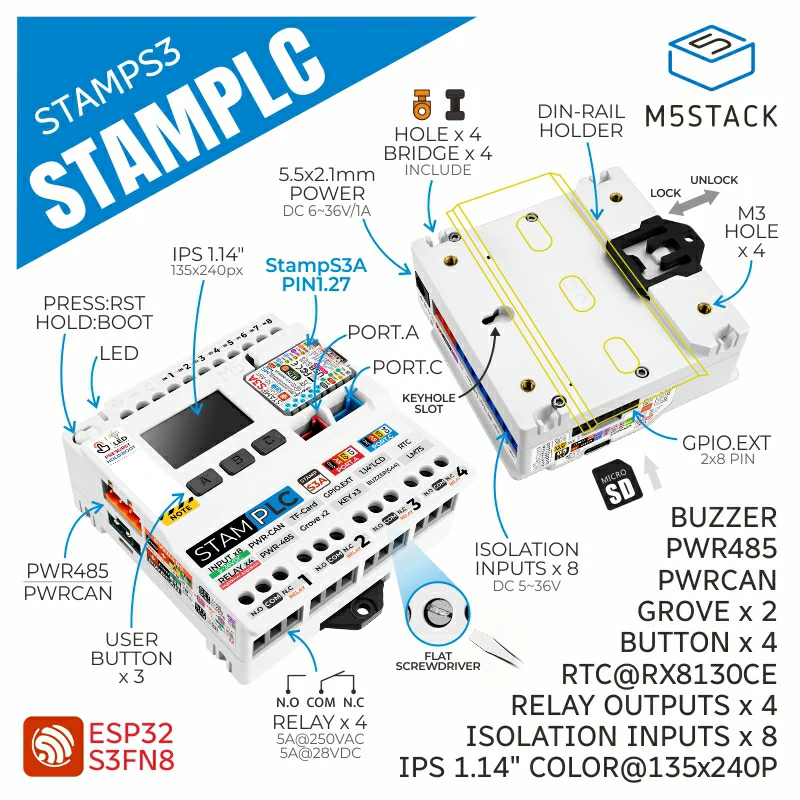
Create one StamPLC object, then access relay outputs, digital inputs, and the
built-in RGB LED from that object.
Channels are 1-based:
relay[1]torelay[4]control the four relay outputs.input[1]toinput[8]read the eight digital inputs.led.red,led.green, andled.bluecontrol the built-in RGB LED.
MicroPython Examples
Relay control
Open the stamplc_relay_control_example.m5f2 project in UiFlow2.
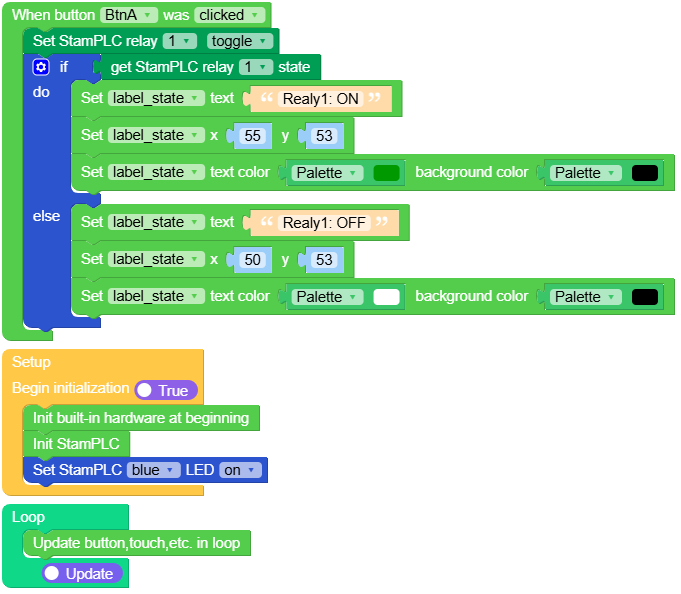
This example uses button A to toggle relay output 1 and turns on the built-in blue LED.
UiFlow2 Code Block:
MicroPython Code Block:
 1# SPDX-FileCopyrightText: 2026 M5Stack Technology CO LTD
 2#
 3# SPDX-License-Identifier: MIT
 4
 5import os, sys, io
 6import M5
 7from M5 import *
 8from stamplc import StamPLC
 9
10
11title0 = None
12label_tip = None
13label_state = None
14stamplc_0 = None
15
16
17def btna_was_clicked_event(state):
18    global title0, label_tip, label_state, stamplc_0
19    stamplc_0.relay[1].toggle()
20    if stamplc_0.relay[1].value():
21        label_state.setText(str("Realy1: ON"))
22        label_state.setCursor(x=55, y=53)
23        label_state.setColor(0x009900, 0x000000)
24    else:
25        label_state.setText(str("Realy1: OFF"))
26        label_state.setCursor(x=50, y=53)
27        label_state.setColor(0xFFFFFF, 0x000000)
28
29
30def setup():
31    global title0, label_tip, label_state, stamplc_0
32
33    M5.begin()
34    Widgets.fillScreen(0x000000)
35    title0 = Widgets.Title("Relay Control", 3, 0xFFFFFF, 0x0000FF, Widgets.FONTS.Montserrat24)
36    label_tip = Widgets.Label(
37        "BtnA control relay1", 33, 103, 1.0, 0xFFFFFF, 0x000000, Widgets.FONTS.Montserrat18
38    )
39    label_state = Widgets.Label(
40        "Realy1: OFF", 50, 53, 1.0, 0xFFFFFF, 0x000000, Widgets.FONTS.Montserrat24
41    )
42
43    BtnA.setCallback(type=BtnA.CB_TYPE.WAS_CLICKED, cb=btna_was_clicked_event)
44
45    stamplc_0 = StamPLC()
46    stamplc_0.led.blue.on()
47
48
49def loop():
50    global title0, label_tip, label_state, stamplc_0
51    M5.update()
52
53
54if __name__ == "__main__":
55    try:
56        setup()
57        while True:
58            loop()
59    except (Exception, KeyboardInterrupt) as e:
60        try:
61            from utility import print_error_msg
62
63            print_error_msg(e)
64        except ImportError:
65            print("please update to latest firmware")
Digital input control
Open the stamplc_input_example.m5f2 project in UiFlow2.
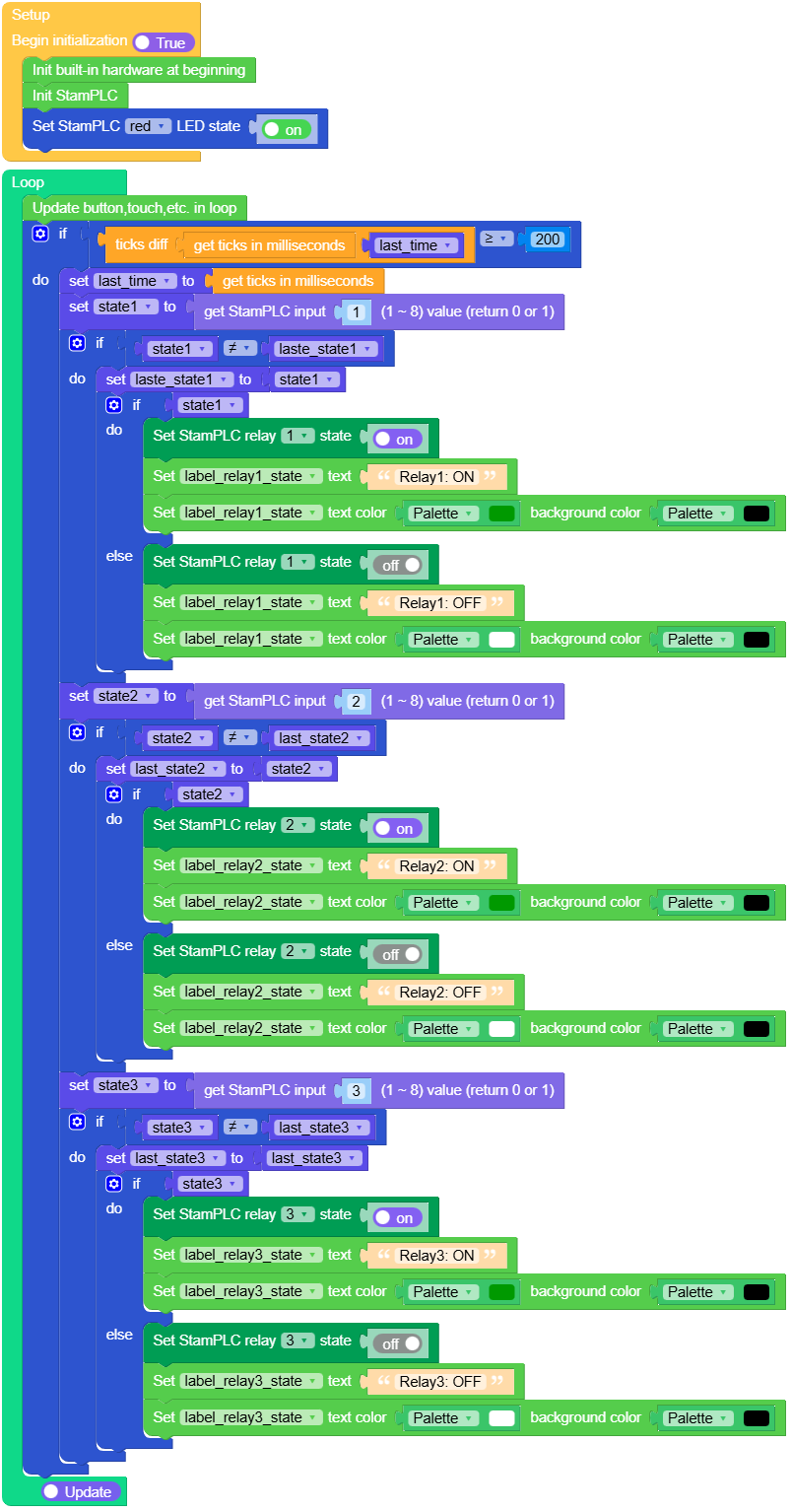
This example reads digital inputs 1-3 and uses them to control relay outputs 1-3.
UiFlow2 Code Block:
MicroPython Code Block:
  1# SPDX-FileCopyrightText: 2026 M5Stack Technology CO LTD
  2#
  3# SPDX-License-Identifier: MIT
  4
  5import os, sys, io
  6import M5
  7from M5 import *
  8import time
  9from stamplc import StamPLC
 10
 11
 12title0 = None
 13label_relay1_state = None
 14label_relay2_state = None
 15label_relay3_state = None
 16stamplc_0 = None
 17
 18
 19last_time = None
 20state1 = None
 21laste_state1 = None
 22state2 = None
 23last_state2 = None
 24state3 = None
 25last_state3 = None
 26
 27
 28def setup():
 29    global \
 30        title0, \
 31        label_relay1_state, \
 32        label_relay2_state, \
 33        label_relay3_state, \
 34        stamplc_0, \
 35        last_time, \
 36        state1, \
 37        laste_state1, \
 38        state2, \
 39        last_state2, \
 40        state3, \
 41        last_state3
 42
 43    M5.begin()
 44    Widgets.fillScreen(0x000000)
 45    title0 = Widgets.Title(
 46        "Input control relay", 3, 0xFFFFFF, 0x0000FF, Widgets.FONTS.Montserrat24
 47    )
 48    label_relay1_state = Widgets.Label(
 49        "Relay1: OFF", 10, 35, 1.0, 0xFFFFFF, 0x000000, Widgets.FONTS.Montserrat18
 50    )
 51    label_relay2_state = Widgets.Label(
 52        "Relay2: OFF", 10, 65, 1.0, 0xFFFFFF, 0x000000, Widgets.FONTS.Montserrat18
 53    )
 54    label_relay3_state = Widgets.Label(
 55        "Relay3: OFF", 10, 95, 1.0, 0xFFFFFF, 0x000000, Widgets.FONTS.Montserrat18
 56    )
 57
 58    stamplc_0 = StamPLC()
 59    stamplc_0.led.red.value(1)
 60
 61
 62def loop():
 63    global \
 64        title0, \
 65        label_relay1_state, \
 66        label_relay2_state, \
 67        label_relay3_state, \
 68        stamplc_0, \
 69        last_time, \
 70        state1, \
 71        laste_state1, \
 72        state2, \
 73        last_state2, \
 74        state3, \
 75        last_state3
 76    M5.update()
 77    if (time.ticks_diff((time.ticks_ms()), last_time)) >= 200:
 78        last_time = time.ticks_ms()
 79        state1 = stamplc_0.input[1].value()
 80        if state1 != laste_state1:
 81            laste_state1 = state1
 82            if state1:
 83                stamplc_0.relay[1].value(1)
 84                label_relay1_state.setText(str("Relay1: ON"))
 85                label_relay1_state.setColor(0x009900, 0x000000)
 86            else:
 87                stamplc_0.relay[1].value(0)
 88                label_relay1_state.setText(str("Relay1: OFF"))
 89                label_relay1_state.setColor(0xFFFFFF, 0x000000)
 90        state2 = stamplc_0.input[2].value()
 91        if state2 != last_state2:
 92            last_state2 = state2
 93            if state2:
 94                stamplc_0.relay[2].value(1)
 95                label_relay2_state.setText(str("Relay2: ON"))
 96                label_relay2_state.setColor(0x009900, 0x000000)
 97            else:
 98                stamplc_0.relay[2].value(0)
 99                label_relay2_state.setText(str("Relay2: OFF"))
100                label_relay2_state.setColor(0xFFFFFF, 0x000000)
101        state3 = stamplc_0.input[3].value()
102        if state3 != last_state3:
103            last_state3 = last_state3
104            if state3:
105                stamplc_0.relay[3].value(1)
106                label_relay3_state.setText(str("Relay3: ON"))
107                label_relay3_state.setColor(0x009900, 0x000000)
108            else:
109                stamplc_0.relay[3].value(0)
110                label_relay3_state.setText(str("Relay3: OFF"))
111                label_relay3_state.setColor(0xFFFFFF, 0x000000)
112
113
114if __name__ == "__main__":
115    try:
116        setup()
117        while True:
118            loop()
119    except (Exception, KeyboardInterrupt) as e:
120        try:
121            from utility import print_error_msg
122
123            print_error_msg(e)
124        except ImportError:
125            print("please update to latest firmware")
API
StamPLC
- class StamPLC
Create a StamPLC board helper.
UiFlow2 Code Block:

MicroPython Code Block:
from stamplc import StamPLC

plc = StamPLC()
- relay
Relay output bank. Relay channels are indexed from 1 to 4. Relays are initialized to
False/off whenStamPLC()is created.- relay[channel].on()
Turn one relay output on.
- Parameters:
channel (int) – Relay channel, 1-4.
UiFlow2 Code Block:

MicroPython Code Block:
plc.relay[1].on()
- relay[channel].off()
Turn one relay output off.
- Parameters:
channel (int) – Relay channel, 1-4.
UiFlow2 Code Block:
MicroPython Code Block:
plc.relay[1].off()
- relay[channel].toggle()
Toggle one relay output.
- Parameters:
channel (int) – Relay channel, 1-4.
UiFlow2 Code Block:
MicroPython Code Block:
plc.relay[1].toggle()
- relay[channel].value(state=None)
Get or set one relay output.
- Parameters:
- Returns:
Relay state when
stateis omitted.- Return type:
bool or None
UiFlow2 Code Block:


MicroPython Code Block:
plc.relay[1].value(True)
state = plc.relay[1].value()
- input
Digital input bank. All digital input channels are initialized as inputs when
StamPLC()is created. Input channels are indexed from 1 to 8.- input[channel].value()
Read one input channel.
- Parameters:
channel (int) – Input channel, 1-8.
- Returns:
The selected input value,
0or1.- Return type:
UiFlow2 Code Block:

MicroPython Code Block:
input_1 = plc.input[1].value()
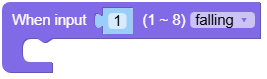
- input[channel].irq(handler, trigger)
Set an interrupt handler for one input channel. The callback receives the input pin object; use
pin.channelto get the channel number.- Parameters:
UiFlow2 Code Block:
MicroPython Code Block:
def input_1_falling_event(pin):
    print("input", pin.channel, "falling")

plc.input[1].irq(input_1_falling_event, plc.input.IRQ_FALLING)
- led
Built-in RGB LED controller. The LED is driven by PI4IOE5V6408: red maps to P6, green maps to P5, and blue maps to P4.
led.red,led.green, andled.blueprovide the same methods.- led.red.on()
Turn the red LED on.
UiFlow2 Code Block:

MicroPython Code Block:
plc.led.red.on()
- led.red.off()
Turn the red LED off.
UiFlow2 Code Block:
MicroPython Code Block:
plc.led.red.off()
- led.red.toggle()
Toggle the red LED.
UiFlow2 Code Block:
MicroPython Code Block:
plc.led.red.toggle()
- led.red.value(state=None)
Get or set the red LED state.
- Parameters:
state (bool) – Optional LED state.
Trueturns the LED on,Falseturns it off.- Returns:
LED state when
stateis omitted.- Return type:
bool or None
UiFlow2 Code Block:

MicroPython Code Block:
plc.led.red.value(True)
state = plc.led.red.value()
MicroPython Code Block:
plc.led.green.on()
plc.led.blue.off()
plc.led.blue.toggle()