Chain Switch
SwitchChain is the helper class for switch devices on the Chain bus. It provides methods to read ADC values (12-bit and 8-bit), configure switch thresholds, set slip mode, and monitor switch status changes.
Support the following products:
UiFlow2 Example
Switch status monitoring
Open the m5core_chain_switch_basic_example.m5f2 project in UiFlow2.
This example demonstrates how to read ADC values and switch status from the Chain Switch sensor and display them on screen. It registers open/close trigger callbacks and updates the status label when the switch state changes.
UiFlow2 Code Block:
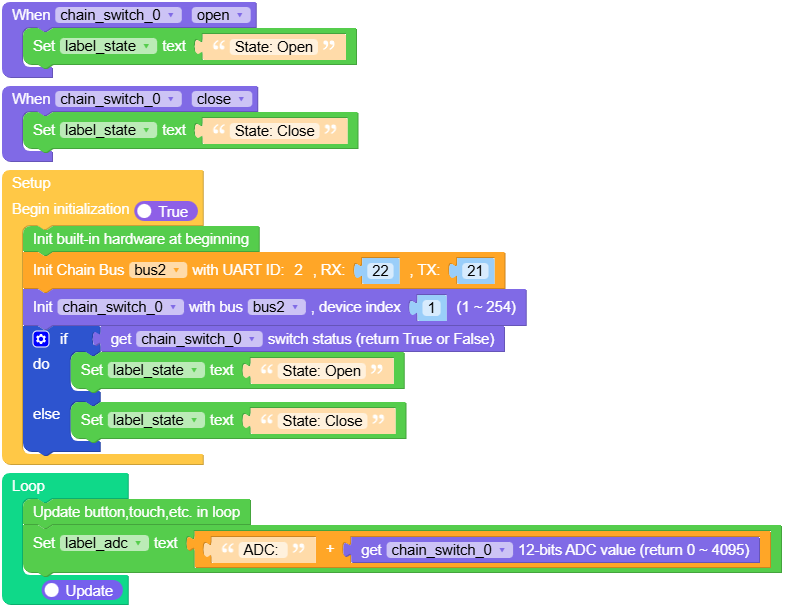
Example output:
None
MicroPython Example
Switch status monitoring
This example demonstrates how to read ADC values and switch status from the Chain Switch sensor and display them on screen. It registers open/close trigger callbacks and updates the status label when the switch state changes.
MicroPython Code Block:
 1# SPDX-FileCopyrightText: 2026 M5Stack Technology CO LTD
 2#
 3# SPDX-License-Identifier: MIT
 4
 5import os, sys, io
 6import M5
 7from M5 import *
 8from chain import SwitchChain
 9from chain import ChainBus
10
11
12title0 = None
13label_adc = None
14label_state = None
15bus2 = None
16chain_switch_0 = None
17
18
19def chain_switch_0_open_event(args):
20    global title0, label_adc, label_state, bus2, chain_switch_0
21    label_state.setText(str("State: Open"))
22
23
24def chain_switch_0_close_event(args):
25    global title0, label_adc, label_state, bus2, chain_switch_0
26    label_state.setText(str("State: Close"))
27
28
29def setup():
30    global title0, label_adc, label_state, bus2, chain_switch_0
31
32    M5.begin()
33    Widgets.setRotation(1)
34    Widgets.fillScreen(0x000000)
35    title0 = Widgets.Title("Chain Switch Example", 3, 0xFFFFFF, 0x0000FF, Widgets.FONTS.DejaVu24)
36    label_adc = Widgets.Label("ADC: --", 20, 70, 1.0, 0xFFFFFF, 0x000000, Widgets.FONTS.DejaVu24)
37    label_state = Widgets.Label(
38        "State: --", 20, 113, 1.0, 0xFFFFFF, 0x000000, Widgets.FONTS.DejaVu24
39    )
40
41    bus2 = ChainBus(2, tx=21, rx=22)
42    chain_switch_0 = SwitchChain(bus2, 1)
43    chain_switch_0.set_trigger_callback(SwitchChain.STATUS_OPEN, chain_switch_0_open_event)
44    chain_switch_0.set_trigger_callback(SwitchChain.STATUS_CLOSE, chain_switch_0_close_event)
45    chain_switch_0.set_trigger(True)
46    if chain_switch_0.get_switch_status():
47        label_state.setText(str("State: Open"))
48    else:
49        label_state.setText(str("State: Close"))
50
51
52def loop():
53    global title0, label_adc, label_state, bus2, chain_switch_0
54    M5.update()
55    label_adc.setText(str((str("ADC: ") + str((chain_switch_0.get_adc12())))))
56
57
58if __name__ == "__main__":
59    try:
60        setup()
61        while True:
62            loop()
63    except (Exception, KeyboardInterrupt) as e:
64        try:
65            bus2.deinit()
66            from utility import print_error_msg
67
68            print_error_msg(e)
69        except ImportError:
70            print("please update to latest firmware")
Example output:
None
API
SwitchChain
- class chain.switch.SwitchChain(bus, device_id)
Bases:
KeyChainSwitch Chain class for interacting with switch devices over Chain bus.
- Parameters:
UiFlow2 Code Block:

MicroPython Code Block:
from chain import ChainBus
from chain import SwitchChain

bus2 = ChainBus(2, tx=21, rx=22)
chain_switch_0 = SwitchChain(bus2, 1)
For other button and some general methods, please refer to the
ChainKeyclass.- get_adc12()
Get the 12-bit ADC value of the switch.
- Returns:
12-bit ADC value (0-4095), or None if failed.
- Return type:
UiFlow2 Code Block:

MicroPython Code Block:
value = chain_switch_0.get_adc12()
- get_adc8()
Get the 8-bit ADC value of the switch.
- Returns:
8-bit ADC value (0-255), or None if failed.
- Return type:
UiFlow2 Code Block:

MicroPython Code Block:
value = chain_switch_0.get_adc8()
- set_slip_mode(mode, save=False)
Set the slider change mode.
- Parameters:
- Returns:
True if the operation was successful, False otherwise.
- Return type:
UiFlow2 Code Block:

MicroPython Code Block:
success = chain_switch_0.set_slip_mode(SwitchChain.SLIP_MODE_DOWNUP_INC, True)
- get_slip_mode()
Get the slider change mode.
- Returns:
Slider change mode.
SwitchChain.SLIP_MODE_DOWNUP_DEC(0) for decreasing orSwitchChain.SLIP_MODE_DOWNUP_INC(1) for increasing. Returns None if failed.- Return type:
UiFlow2 Code Block:

MicroPython Code Block:
mode = chain_switch_0.get_slip_mode()
- set_switch_thresh(open_threshold, close_threshold, save=False)
Set the switch open and close thresholds.
- Parameters:
- Returns:
True if the operation was successful, False otherwise.
- Return type:
UiFlow2 Code Block:

MicroPython Code Block:
success = chain_switch_0.set_switch_thresh(3000, 1000, True)
- get_open_thresh()
Get the switch open threshold.
- Returns:
Open threshold value (0-4095), or None if failed.
- Return type:
UiFlow2 Code Block:

MicroPython Code Block:
open_th = chain_switch_0.get_open_thresh()
- get_close_thresh()
Get the switch close threshold.
- Returns:
Close threshold value (0-4095), or None if failed.
- Return type:
UiFlow2 Code Block:

MicroPython Code Block:
close_th = chain_switch_0.get_close_thresh()
- get_switch_status()
Get the switch status.
- Returns:
Switch status. 0 means close, 1 means open. Returns None if failed.
- Return type:
UiFlow2 Code Block:

MicroPython Code Block:
status = chain_switch_0.get_switch_status()
- set_trigger(enable)
Enable or disable status change reporting.
- Parameters:
enable (bool) – True to enable status change reporting, False to disable it.
- Returns:
True if the operation was successful, False otherwise.
- Return type:
UiFlow2 Code Block:

MicroPython Code Block:
success = chain_switch_0.set_trigger(True)
- get_trigger()
Get whether status change reporting is enabled.
- Returns:
True if status change reporting is enabled, False if disabled. Returns False if failed.
- Return type:
UiFlow2 Code Block:

MicroPython Code Block:
enabled = chain_switch_0.get_trigger()
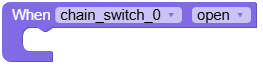
- set_trigger_callback(trigger_type, callback)
Set callback for switch status change events.
- Parameters:
trigger_type (int) – Trigger type to listen for. Use
SwitchChain.STATUS_CLOSE(0) orSwitchChain.STATUS_OPEN(1).callback – Callback function that will be called when switch status changes.
- Return type:
None
Note
Chain related methods cannot be called in the callback function.
UiFlow2 Code Block:
MicroPython Code Block:
def switch_status_callback():
    print("Switch opened")

# Listen for open status only
chain_switch_0.set_trigger_callback(SwitchChain.STATUS_OPEN, switch_status_callback)

# Listen for close status only
chain_switch_0.set_trigger_callback(SwitchChain.STATUS_CLOSE, switch_status_callback)