M5Label
M5Label is a widget that can be used to create labels in the user interface. It can display text and can be styled with different fonts, colors, and sizes.
Important
Available Fonts: For m5ui widgets, use LVGL fonts such as
lv.font_montserrat_12, 14, 16, 18, 24, 40, 44,
and 48. Some builds, such as Tab5, also include 20, 22, 30,
and 36. Check with hasattr(lv, "font_montserrat_20") before using
an optional size in cross-board examples. The Alibaba CJK fonts are
M5.Lcd.FONTS fonts for M5.Lcd / M5.Widgets drawing, not
lv.font_montserrat_* objects.
UiFlow2 Example
scroll label
Open the cores3_scroll_label_example.m5f2 project in UiFlow2.
This example demonstrates how to create a label that scrolls text in a circular manner.
UiFlow2 Code Block:
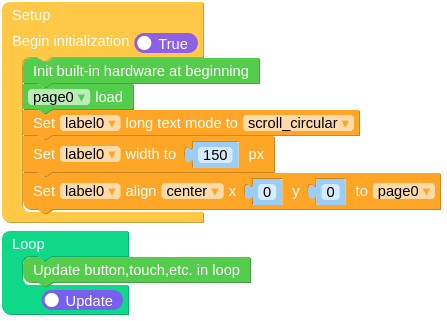
Example output:
None
MicroPython Example
scroll label
This example demonstrates how to create a label that scrolls text in a circular manner.
MicroPython Code Block:
 1# SPDX-FileCopyrightText: 2025 M5Stack Technology CO LTD
 2#
 3# SPDX-License-Identifier: MIT
 4
 5import os, sys, io
 6import M5
 7from M5 import *
 8import m5ui
 9import lvgl as lv
10
11
12page0 = None
13label0 = None
14
15
16def setup():
17    global page0, label0
18
19    M5.begin()
20    m5ui.init()
21    page0 = m5ui.M5Page(bg_c=0xFFFFFF)
22    label0 = m5ui.M5Label(
23        "It is a circularly scrolling text. ",
24        x=60,
25        y=110,
26        text_c=0x000000,
27        bg_c=0xFFFFFF,
28        bg_opa=0,
29        font=lv.font_montserrat_14,
30        parent=page0,
31    )
32
33    page0.screen_load()
34    label0.set_long_mode(lv.label.LONG_MODE.SCROLL_CIRCULAR)
35    label0.set_width(150)
36    label0.align_to(page0, lv.ALIGN.CENTER, 0, 0)
37
38
39def loop():
40    global page0, label0
41    M5.update()
42
43
44if __name__ == "__main__":
45    try:
46        setup()
47        while True:
48            loop()
49    except (Exception, KeyboardInterrupt) as e:
50        try:
51            m5ui.deinit()
52            from utility import print_error_msg
53
54            print_error_msg(e)
55        except ImportError:
56            print("please update to latest firmware")
Example output:
None
API
M5Label
Note
Unlike M5Button and M5Chart, the M5Label constructor does
not accept w or h parameters. Label size is determined
automatically by its text content. To explicitly set a label’s width,
call label.set_width(150) after creation.
- class m5ui.label.M5Label(*args, **kwargs)
Bases:
labelCreate a label object.
- Parameters:
text (str) – The text to display on the label.
x (int) – The x position of the label.
y (int) – The y position of the label.
text_c (int) – The text color of the label in hexadecimal format.
bg_c (int) – The background color of the label in hexadecimal format.
bg_opa (int) – The background opacity of the label (0-255).
font (lv.lv_font_t) – The font to use for the button text.
parent (lv.obj) – The parent object to attach the button to. If not specified, the button will be attached to the default screen.
UiFlow2 Code Block:
None
MicroPython Code Block:
from m5ui import M5Label
import lvgl as lv

m5ui.init()
label_0 = M5Label(text="Hello, World!", x=10, y=10, text_c=0x212121, bg_c=0xFFFFFF, bg_opa=0, font=lv.font_montserrat_14, parent=page0)
- set_flag(flag, value)
Set a flag on the object. If
valueis True, the flag is added; if False, the flag is removed.- Parameters:
- Returns:
None
UiFlow2 Code Block:

MicroPython Code Block:
label_0.set_flag(lv.obj.FLAG.HIDDEN, True)
- toggle_flag(flag)
Toggle a flag on the object. If the flag is set, it is removed; if not set, it is added.
- Parameters:
flag (int) – The flag to toggle.
- Returns:
None
UiFlow2 Code Block:

MicroPython Code Block:
label_0.toggle_flag(lv.obj.FLAG.HIDDEN)
- set_state(state, value)
Set the state of the label. If
valueis True, the state is set; if False, the state is unset.- Parameters:
- Returns:
None
UiFlow2 Code Block:

MicroPython Code Block:
label_0.set_state(lv.STATE.PRESSED, True)
- toggle_state(state)
Toggle the state of the label. If the state is set, it is unset; if not set, it is set.
- Parameters:
state (int) – The state to toggle.
- Returns:
None
UiFlow2 Code Block:

MicroPython Code Block:
label_0.toggle_state(lv.STATE.PRESSED)
- set_style_text_font(font, part)
Set the font of the label text.
- Parameters:
font (lv.lv_font_t) – The font to set.
part (int) – The part of the object to apply the style to (e.g., lv.PART.MAIN).
- Returns:
None
UiFlow2 Code Block:

MicroPython Code Block:
label_0.set_style_text_font(lv.font_montserrat_14, lv.PART.MAIN | lv.STATE.DEFAULT)
- set_text_color(color, opa, part)
Set the color of the text.
- Parameters:
- Returns:
None
UiFlow2 Code Block:

MicroPython Code Block:
label_0.set_text_color(lv.color_hex(0x000000), 255, lv.PART.MAIN | lv.STATE.DEFAULT)
- set_bg_color(color, opa, part)
Set the background color of the label.
- Parameters:
- Returns:
None
UiFlow2 Code Block:
MicroPython Code Block:
label_0.set_bg_color(lv.color_hex(0x000000), 255, lv.PART.MAIN | lv.STATE.DEFAULT)
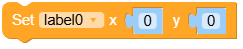
- set_pos(x, y)
Set the position of the label.
- Parameters:
- Returns:
None
UiFlow2 Code Block:
MicroPython Code Block:
label_0.set_pos(100, 100)
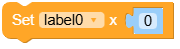
- set_x(x)
Set the x-coordinate of the label.
- Parameters:
x (int) – The x-coordinate of the label.
- Returns:
None
UiFlow2 Code Block:
MicroPython Code Block:
label_0.set_x(100)
- set_y(y)
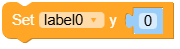
Set the y-coordinate of the label.
- Parameters:
y (int) – The y-coordinate of the label.
- Returns:
None
UiFlow2 Code Block:
MicroPython Code Block:
label_0.set_y(100)
- set_size(width, height)
Set the size of the label.
- Parameters:
- Returns:
None
UiFlow2 Code Block:

MicroPython Code Block:
label_0.set_size(100, 50)
- set_width(width)
Set the width of the label.
- Parameters:
width (int) – The width of the label.
- Returns:
None
UiFlow2 Code Block:


MicroPython Code Block:
label_0.set_width(100)
- align_to(obj, align, x, y)
Align the label to another object.
- Parameters:
- Returns:
None
UiFlow2 Code Block:

MicroPython Code Block:
label_0.align_to(page_0, lv.ALIGN.CENTER, 0, 0)
- set_shadow(color, opa, align, offset_x, offset_y)
Set a shadow for the label.
- Parameters:
- Returns:
None
- Return type:
None
UiFlow2 Code Block:

MicroPython Code Block:
label_0.set_shadow(color=0x000000, opa=128, align=lv.ALIGN.BOTTOM_RIGHT, offset_x=5, offset_y=5)
- unset_shadow()
Remove the shadow from the label.
UiFlow2 Code Block:

MicroPython Code Block:
label_0.unset_shadow()
- Return type:
None