Tab5 Keyboard
The Keyboard class controls the Tab5 keyboard controller over I2C. It supports character input callbacks, raw key matrix events, keyboard mode configuration, backlight brightness, RGB LED settings, and I2C address management.
UiFlow2 Example
keyboard input
Open the tab5_keyboard_example.m5f2 project in UiFlow2.
This example reads character input from the Tab5 keyboard and appends it to a text area.
UiFlow2 Code Block:
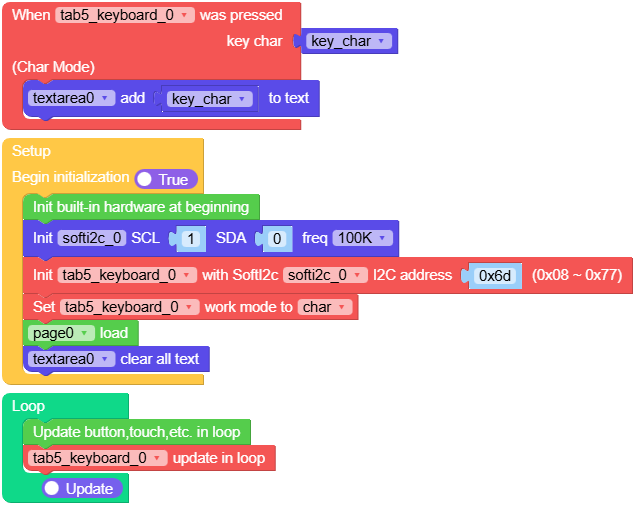
Example output:
None
MicroPython Example
keyboard input
This example reads character input from the Tab5 keyboard and appends it to a text area.
MicroPython Code Block:
 1# SPDX-FileCopyrightText: 2026 M5Stack Technology CO LTD
 2#
 3# SPDX-License-Identifier: MIT
 4
 5import os, sys, io
 6import M5
 7from M5 import *
 8import m5ui
 9import lvgl as lv
10from tab5 import Keyboard
11from hardware import Pin
12from hardware import SoftI2C
13
14
15page0 = None
16textarea0 = None
17tab5_keyboard_0 = None
18
19
20key_char = None
21
22
23def tab5_keyboard_0_char_pressed_event(kb):
24    global page0, textarea0, tab5_keyboard_0, key_char
25    key_char = kb
26    textarea0.add_text(str(key_char))
27
28
29def setup():
30    global page0, textarea0, tab5_keyboard_0, key_char
31
32    M5.begin()
33    Widgets.setRotation(3)
34    m5ui.init()
35    page0 = m5ui.M5Page(bg_c=0xFFFFFF)
36    textarea0 = m5ui.M5TextArea(
37        text="textarea0",
38        placeholder="Placeholder...",
39        x=0,
40        y=0,
41        w=1280,
42        h=720,
43        font=lv.font_montserrat_24,
44        bg_c=0xFFFFFF,
45        border_c=0xE0E0E0,
46        text_c=0x212121,
47        parent=page0,
48    )
49
50    softi2c_0 = SoftI2C(scl=Pin(1), sda=Pin(0), freq=100000)
51    tab5_keyboard_0 = Keyboard(softi2c_0, 0x6D)
52    tab5_keyboard_0.set_callback(tab5_keyboard_0_char_pressed_event)
53    tab5_keyboard_0.set_keyboard_mode(tab5_keyboard_0.MODE_CHAR)
54    page0.screen_load()
55    textarea0.set_text("")
56
57
58def loop():
59    global page0, textarea0, tab5_keyboard_0, key_char
60    M5.update()
61    tab5_keyboard_0.tick()
62
63
64if __name__ == "__main__":
65    try:
66        setup()
67        while True:
68            loop()
69    except (Exception, KeyboardInterrupt) as e:
70        try:
71            m5ui.deinit()
72            from utility import print_error_msg
73
74            print_error_msg(e)
75        except ImportError:
76            print("please update to latest firmware")
Example output:
None
API
Keyboard
- class tab5.keyboard.Keyboard(i2c, address=109)
Bases:
objectCreate a Tab5 keyboard controller object.
- Parameters:
i2c (I2C) – The I2C bus the Tab5 keyboard is connected to.
address (int) – The I2C address of the keyboard controller. Default is
0x6D.
UiFlow2 Code Block:

MicroPython Code Block:
from tab5 import Keyboard
from hardware import Pin, SoftI2C

softi2c_0 = SoftI2C(scl=Pin(1), sda=Pin(0), freq=100000)
keyboard = Keyboard(softi2c_0, 0x6D)
- available()
Check whether unread keyboard events are queued.
- Returns:
Trueif the controller has pending events.- Return type:
- set_int_enable(mask)
Enable keyboard interrupt sources.
- Parameters:
mask (int) – Interrupt mask composed from
INT_NORMALandINT_CHAR.- Return type:
None
- get_int_status()
Get the current keyboard interrupt status.
- Returns:
The latched interrupt status bits.
- Return type:
- clear_int()
Clear the current keyboard interrupt status.
- Return type:
None
- get_event_count()
Get the number of unread keyboard events.
- Returns:
The number of queued events.
- Return type:
- set_brightness(brightness)
Set the keyboard backlight brightness.
- Parameters:
brightness (int) – Brightness value in the range
0to255.- Return type:
None
UiFlow2 Code Block:

MicroPython Code Block:
keyboard.set_brightness(20)
- get_brightness()
Get the keyboard backlight brightness.
- Returns:
The current brightness value.
- Return type:
UiFlow2 Code Block:

MicroPython Code Block:
keyboard.get_brightness()
- set_keyboard_mode(mode)
Set the keyboard event mode.
- Parameters:
mode (int) – Event mode such as
MODE_NORMALorMODE_CHAR.- Return type:
None
UiFlow2 Code Block:

MicroPython Code Block:
keyboard.set_keyboard_mode(keyboard.MODE_CHAR)
- get_keyboard_mode()
Get the current keyboard event mode.
- Returns:
The current keyboard mode.
- Return type:
- set_rgb_mode(mode)
Set the RGB LED control mode.
- Parameters:
mode (int) – RGB mode such as
RGB_MODE_BOUNDorRGB_MODE_CUSTOM.- Return type:
None
UiFlow2 Code Block:

MicroPython Code Block:
keyboard.set_rgb_mode(keyboard.RGB_MODE_BOUND)
- read_key_event()
Read one key matrix event.
- Returns:
A tuple of
(row, col, pressed)orNonewhen no event is available.- Return type:
tuple | None
- get_char_event_length()
Get the byte length of the queued character event.
- Returns:
The length of the character payload.
- Return type:
- read_char_event()
Read one decoded character event.
- Returns:
A tuple of
(modifier, text)orNonewhen no event is available.- Return type:
tuple | None
- is_pressed()
Check whether the keyboard has pending input.
- Returns:
Trueif unread input is available.- Return type:
- set_callback(handler)
Register the callback used by
tick().- Parameters:
handler (callable) – Callback that receives the keyboard event payload.
MicroPython Code Block:
def on_keyboard(data):
    print(data)

keyboard.set_callback(on_keyboard)
- tick()
Dispatch one pending keyboard event to the registered callback.
- set_rgb_color(led_num, color)
Set the color of a keyboard RGB LED.
- Parameters:
- Return type:
None
UiFlow2 Code Block:

MicroPython Code Block:
keyboard.set_rgb_color(0, 0x6600CC)
- get_rgb_color(led_num)
Get the color of a keyboard RGB LED.
- Parameters:
led_num (int) – The LED index to read.
- Returns:
The 24-bit RGB color value.
- Return type:
UiFlow2 Code Block:

MicroPython Code Block:
keyboard.get_rgb_color(0)
- get_firmware_version()
Get the firmware version of the keyboard controller.
- Returns:
The firmware version byte.
- Return type:
UiFlow2 Code Block:

MicroPython Code Block:
keyboard.get_firmware_version()

