Chain Encoder
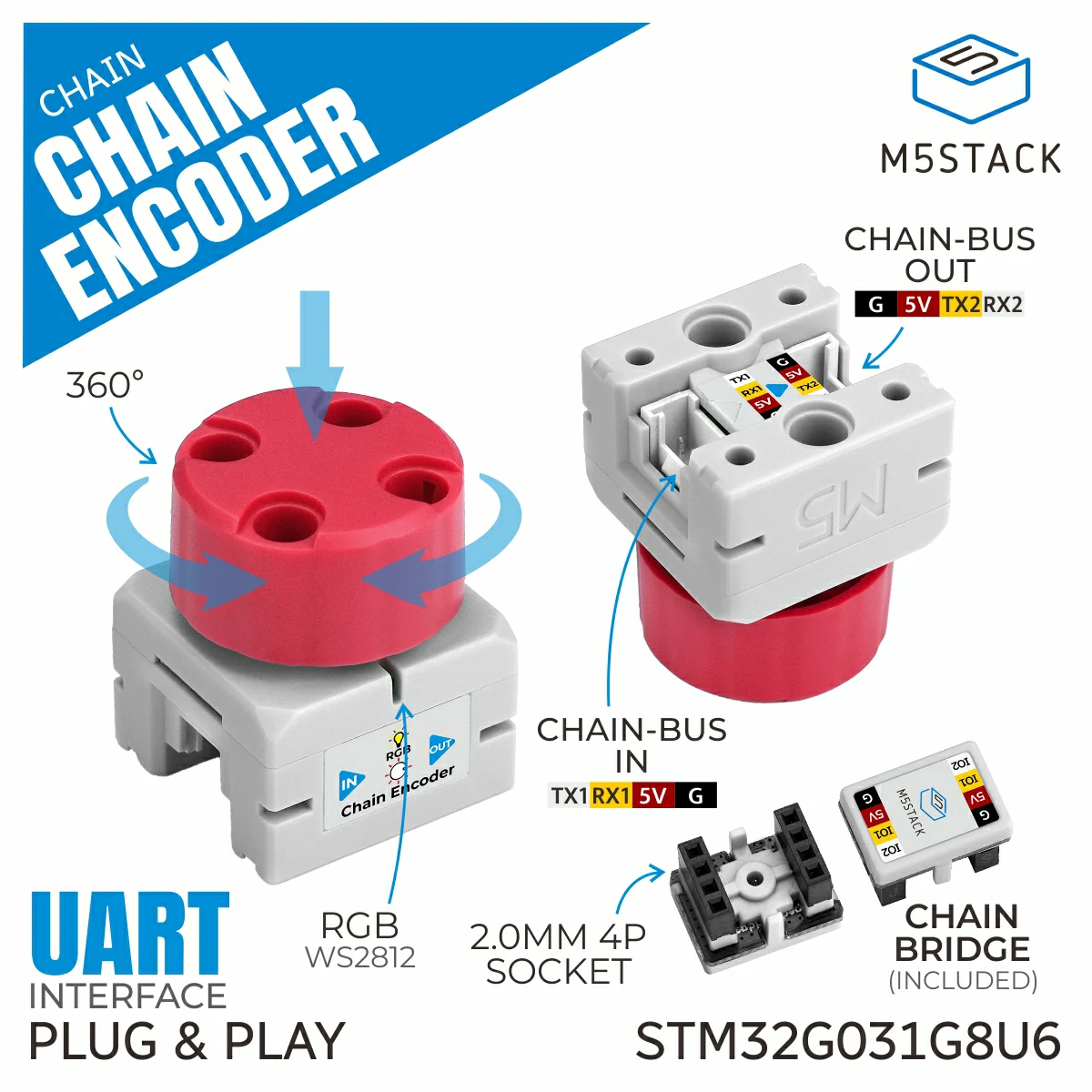
EncoderChain is the helper class for encoder devices on the Chain bus. It provides methods to read encoder values and increments, reset the encoder, configure the clockwise rotation direction, and handle button events with RGB LED feedback.
Support the following products:
UiFlow2 Example
Encoder reading with brightness control
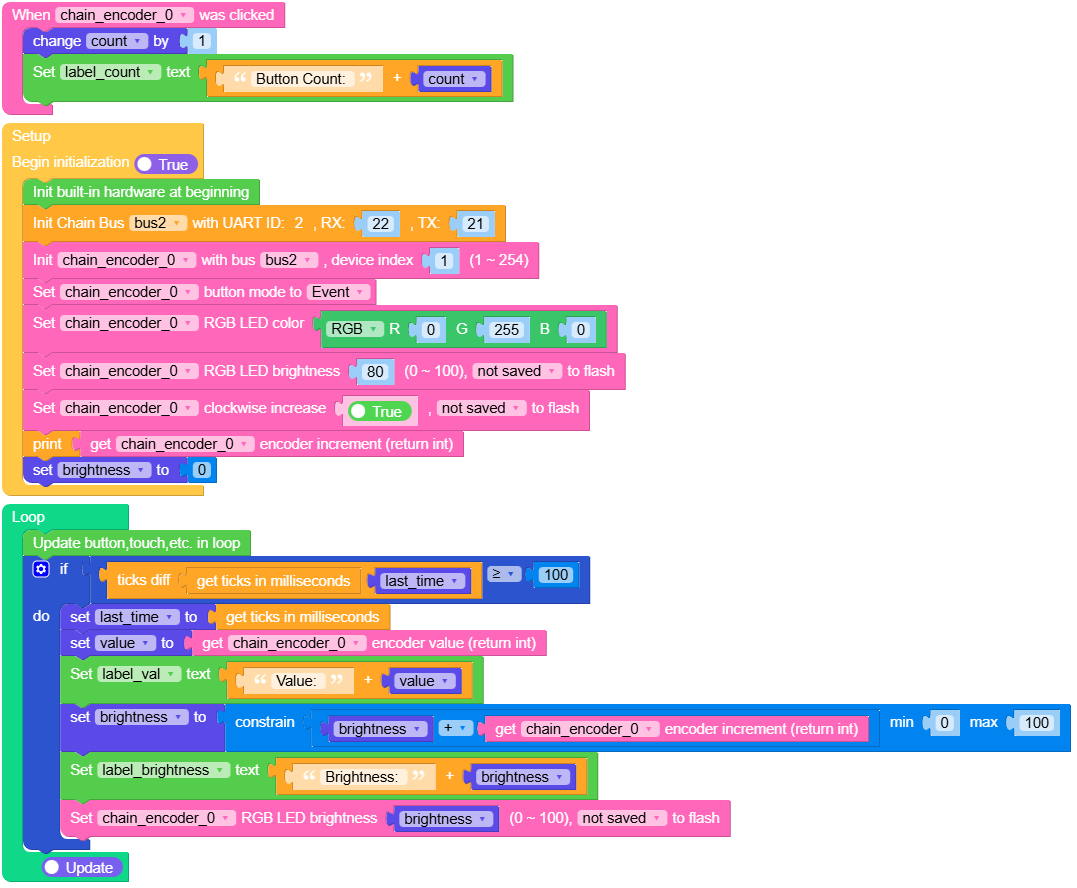
Open the m5core_chain_encoder_basic_example.m5f2 project in UiFlow2.
This example demonstrates how to read encoder values and increments, handle button click events, and control RGB LED brightness based on encoder rotation. The encoder value is displayed on screen and updated in real-time.
UiFlow2 Code Block:
Example output:
None
MicroPython Example
Encoder reading with brightness control
This example demonstrates how to read encoder values and increments, handle button click events, and control RGB LED brightness based on encoder rotation. The encoder value is displayed on screen and updated in real-time.
MicroPython Code Block:
 1# SPDX-FileCopyrightText: 2025 M5Stack Technology CO LTD
 2#
 3# SPDX-License-Identifier: MIT
 4
 5import os, sys, io
 6import M5
 7from M5 import *
 8from chain import EncoderChain
 9from chain import ChainBus
10import time
11
12
13
14title0 = None
15label_brightness = None
16label_val = None
17label_count = None
18bus2 = None
19chain_encoder_0 = None
20count = None
21last_time = None
22value = None
23brightness = None
24
25
26def chain_encoder_0_click_event(args):
27    global title0, label_brightness, label_val, label_count, bus2, chain_encoder_0, count, last_time, value, brightness
28    count = (count if isinstance(count, (int, float)) else 0) + 1
29    label_count.setText(str((str('Button Count: ') + str(count))))
30
31def setup():
32    global title0, label_brightness, label_val, label_count, bus2, chain_encoder_0, count, last_time, value, brightness
33    M5.begin()
34    Widgets.setRotation(1)
35    Widgets.fillScreen(0x222222)
36    title0 = Widgets.Title("Title", 3, 0xffffff, 0x0000FF, Widgets.FONTS.DejaVu24)
37    label_brightness = Widgets.Label("Brightness:", 5, 100, 1.0, 0xffffff, 0x222222, Widgets.FONTS.DejaVu24)
38    label_val = Widgets.Label("Value:", 5, 60, 1.0, 0xffffff, 0x222222, Widgets.FONTS.DejaVu24)
39    label_count = Widgets.Label("Button Count:", 5, 140, 1.0, 0xffffff, 0x222222, Widgets.FONTS.DejaVu24)
40    bus2 = ChainBus(2, tx=21, rx=22)
41    chain_encoder_0 = EncoderChain(bus2, 1)
42    chain_encoder_0.set_click_callback(chain_encoder_0_click_event)
43    chain_encoder_0.set_button_mode(chain_encoder_0.MODE_EVENT)
44    chain_encoder_0.set_rgb_color(0x00ff00)
45    chain_encoder_0.set_rgb_brightness(80, save=False)
46    chain_encoder_0.set_cw_increase(True, save=False)
47    print(chain_encoder_0.get_encoder_increment())
48    brightness = 0
49
50
51def loop():
52    global title0, label_brightness, label_val, label_count, bus2, chain_encoder_0, count, last_time, value, brightness
53    M5.update()
54    if (time.ticks_diff((time.ticks_ms()), last_time)) >= 100:
55        last_time = time.ticks_ms()
56        value = chain_encoder_0.get_encoder_value()
57        label_val.setText(str((str('Value: ') + str(value))))
58        brightness = min(max(brightness + (chain_encoder_0.get_encoder_increment()), 0), 100)
59        label_brightness.setText(str((str('Brightness: ') + str(brightness))))
60        chain_encoder_0.set_rgb_brightness(brightness, save=False)
61
62
63if __name__ == "__main__":
64    try:
65        setup()
66        while True:
67            loop()
68    except (Exception, KeyboardInterrupt) as e:
69        try:
70            bus2.deinit()
71            from utility import print_error_msg
72
73            print_error_msg(e)
74        except ImportError:
75            print("please update to latest firmware")
Example output:
None
API
EncoderChain
- class chain.encoder.EncoderChain(bus, device_id)
Bases:
KeyChainEncoder Chain class for interacting with encoder devices over Chain bus.
- Parameters:
UiFlow2 Code Block:

MicroPython Code Block:
from chain import ChainBus
from chain import EncoderChain

chainbus_0 = ChainBus(2, 32, 33, verbose=True)
encoder_0 = EncoderChain(chainbus_0, 1)
For other button and some general methods, please refer to the
ChainKeyclass.- get_encoder_value()
Get the encoder value.
- Returns:
Encoder value as int16_t (-32768 to 32767), or None if failed.
- Return type:
UiFlow2 Code Block:

MicroPython Code Block:
value = encoder_0.get_encoder_value()
- get_encoder_increment()
Get the encoder increment value.
- Returns:
Encoder increment value as int16_t (-32768 to 32767), or None if failed.
- Return type:
UiFlow2 Code Block:

MicroPython Code Block:
increment = encoder_0.get_encoder_increment()
- reset_encoder_value()
Reset the encoder value.
- Returns:
True if the operation was successful, False otherwise.
- Return type:
UiFlow2 Code Block:

MicroPython Code Block:
success = encoder_0.reset_encoder_value()
- reset_encoder_increment()
Reset the encoder increment value.
- Returns:
True if the operation was successful, False otherwise.
- Return type:
UiFlow2 Code Block:

MicroPython Code Block:
success = encoder_0.reset_increment()
- set_cw_increase(clockwise_increase=False, save=False)
Set whether clockwise rotation increases the encoder value.
- Parameters:
- Returns:
True if the setting was set successfully, False otherwise.
- Return type:
UiFlow2 Code Block:

MicroPython Code Block:
success = encoder_0.set_cw_increase(True, True)
- get_cw_increase()
Get whether clockwise rotation increases the encoder value.
- Returns:
Whether clockwise rotation increases. True means clockwise increases, False means clockwise decreases. Returns False if failed.
- Return type:
UiFlow2 Code Block:

MicroPython Code Block:
increase = encoder_0.get_cw_increase()