LoRa
LoRa is used to control the built-in long-range wireless communication module inside the host device. Below is the detailed LoRa support for the host:
Controllers |
LoRa |
|---|---|
UnitC6L |
✔ |
Nesso N1 |
✔ |
UiFlow2 Example
Sender
Open the unit_c6l_tx_example.m5f2 project in UiFlow2.
Open the nesso_n1_sender_example.m5f2 project in UiFlow2.
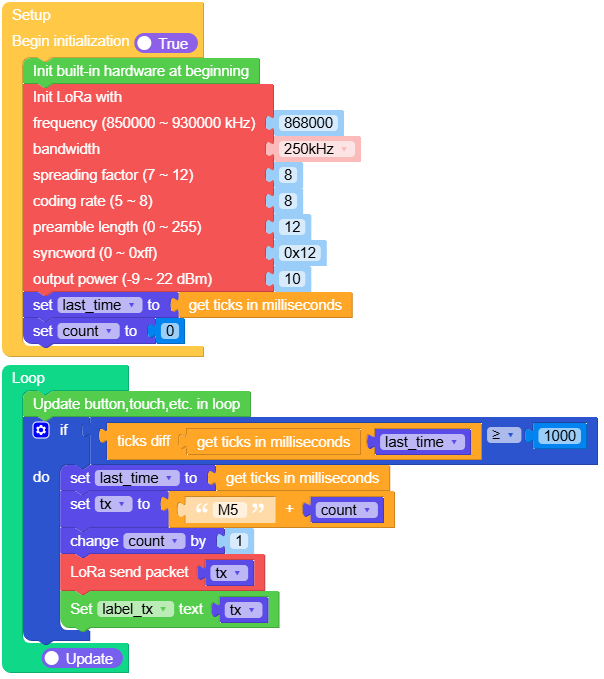
This example sends data every second.
UiFlow2 Code Block:
Example output:
None
Receiver
Open the unit_c6l_rx_example.m5f2 project in UiFlow2.
Open the nesso_n1_receiver_example.m5f2 project in UiFlow2.
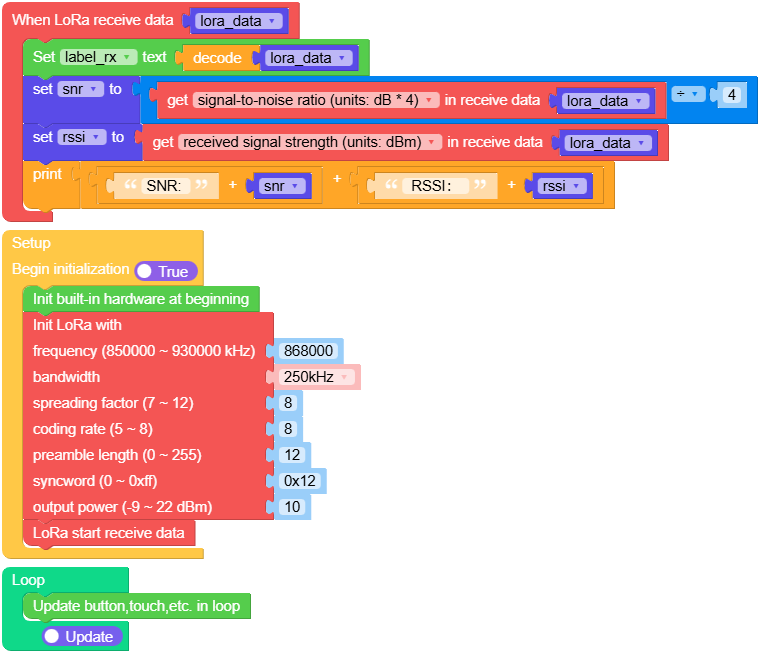
This example receives and displays data.
UiFlow2 Code Block:
Example output:
None
MicroPython Example
Sender
This example sends data every second.
MicroPython Code Block:
 1# SPDX-FileCopyrightText: 2025 M5Stack Technology CO LTD
 2#
 3# SPDX-License-Identifier: MIT
 4
 5import os, sys, io
 6import M5
 7from M5 import *
 8from hardware import LoRa
 9import time
10
11
12title0 = None
13label_tx = None
14lora = None
15last_time = None
16count = None
17tx = None
18
19
20def setup():
21    global title0, label_tx, lora, last_time, count, tx
22    M5.begin()
23    Widgets.fillScreen(0x000000)
24    title0 = Widgets.Title("Tx", 3, 0x000000, 0xFFFFFF, Widgets.FONTS.DejaVu12)
25    label_tx = Widgets.Label("label0", 2, 23, 1.0, 0xFFFFFF, 0x000000, Widgets.FONTS.DejaVu12)
26    lora = LoRa(
27        freq_khz=868000,
28        bw="250",
29        sf=8,
30        coding_rate=8,
31        preamble_len=12,
32        syncword=0x12,
33        output_power=10,
34    )
35    last_time = time.ticks_ms()
36    count = 0
37
38
39def loop():
40    global title0, label_tx, lora, last_time, count, tx
41    M5.update()
42    if (time.ticks_diff((time.ticks_ms()), last_time)) >= 1000:
43        last_time = time.ticks_ms()
44        tx = str("M5 ") + str(count)
45        count = (count if isinstance(count, (int, float)) else 0) + 1
46        lora.send(tx, None)
47        label_tx.setText(str(tx))
48
49
50if __name__ == "__main__":
51    try:
52        setup()
53        while True:
54            loop()
55    except (Exception, KeyboardInterrupt) as e:
56        try:
57            from utility import print_error_msg
58
59            print_error_msg(e)
60        except ImportError:
61            print("please update to latest firmware")
Example output:
None
Receiver
This example receives and displays data.
MicroPython Code Block:
 1# SPDX-FileCopyrightText: 2025 M5Stack Technology CO LTD
 2#
 3# SPDX-License-Identifier: MIT
 4
 5import os, sys, io
 6import M5
 7from M5 import *
 8from hardware import LoRa
 9
10
11title0 = None
12label_rx = None
13lora = None
14lora_data = None
15snr = None
16rssi = None
17
18
19def lora_receive_event(received_data):
20    global title0, label_rx, lora, lora_data, snr, rssi
21    lora_data = received_data
22    label_rx.setText(str(lora_data.decode()))
23    snr = (lora_data.snr) / 4
24    rssi = lora_data.rssi
25    print((str((str("SNR: ") + str(snr))) + str((str(" RSSI: ") + str(rssi)))))
26
27
28def setup():
29    global title0, label_rx, lora, lora_data, snr, rssi
30    M5.begin()
31    Widgets.fillScreen(0x000000)
32    title0 = Widgets.Title("Rx", 3, 0x000000, 0xFFFFFF, Widgets.FONTS.DejaVu12)
33    label_rx = Widgets.Label("label0", 2, 23, 1.0, 0xFFFFFF, 0x000000, Widgets.FONTS.DejaVu12)
34    lora = LoRa(
35        freq_khz=868000,
36        bw="250",
37        sf=8,
38        coding_rate=8,
39        preamble_len=12,
40        syncword=0x12,
41        output_power=10,
42    )
43    lora.set_irq_callback(lora_receive_event)
44    lora.start_recv()
45
46
47def loop():
48    global title0, label_rx, lora, lora_data, snr, rssi
49    M5.update()
50
51
52if __name__ == "__main__":
53    try:
54        setup()
55        while True:
56            loop()
57    except (Exception, KeyboardInterrupt) as e:
58        try:
59            from utility import print_error_msg
60
61            print_error_msg(e)
62        except ImportError:
63            print("please update to latest firmware")
Example output:
None
API
class LoRa
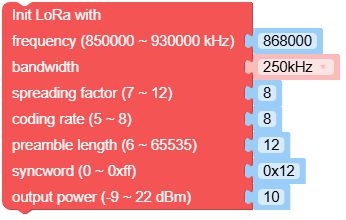
- class hardware.LoRa(freq_khz=868000, bw='250', sf=8, coding_rate=8, reamble_len=12, syncword=0x12, output_power=10)
Create an LoRa object.
- Parameters:
freq_khz (int) – LoRa RF frequency in KHz, with a range of 850000 KHz to 930000 KHz.
bw (str) –
Bandwidth, options include:
"7.8": 7.8 KHz"10.4": 10.4 KHz"15.6": 15.6 KHz"20.8": 20.8 KHz"31.25": 31.25 KHz"41.7": 41.7 KHz"62.5": 62.5 KHz"125": 125 KHz"250": 250 KHz"500": 500 KHz
sf (int) – Spreading factor, range from 7 to 12. Higher spreading factors allow reception of weaker signals but with slower data rates.
coding_rate (int) – Forward Error Correction (FEC) coding rate expressed as 4/N, with a range from 5 to 8.
preamble_len (int) – Length of the preamble sequence in symbols, range from 0 to 255.
syncword (int) – Sync word to mark the start of the data frame, default is 0x12.
output_power (int) – Output power in dBm, range from -9 to 22.
UiFlow2 Code Block:
MicroPython Code Block:
from hardware import LoRa

lora_0 = LoRa(868000, '250', 8, 8, 12, 0x12, 10)
- set_freq(freq_khz)
Set frequency in kHz.
- Parameters:
freq_khz (int) – Frequency in kHz (850000 ~ 930000), default is 868000.
UiFlow2 Code Block:

MicroPython Code Block:
lora_0.set_freq(freq_khz)
- set_sf(sf)
Set spreading factor (SF).
- Parameters:
sf (int) – Spreading factor (7 ~ 12)
UiFlow2 Code Block:

MicroPython Code Block:
lora_0.set_sf(sf)
- set_bw(bw)
Set bandwidth.
- Parameters:
bw (str) – Bandwidth in kHz as string. Must be one of: ‘7.8’, ‘10.4’, ‘15.6’, ‘20.8’, ‘31.25’, ‘41.7’, ‘62.5’, ‘125’, ‘250’, ‘500’.
UiFlow2 Code Block:

MicroPython Code Block:
lora_0.set_bw(bw)
- set_coding_rate(coding_rate)
Set coding rate.
- Parameters:
coding_rate (int) – Coding rate (5 ~ 8)
UiFlow2 Code Block:

MicroPython Code Block:
lora_0.set_coding_rate(coding_rate)
- set_syncword(syncword)
Set syncword.
- Parameters:
syncword (int) – Sync word (0 ~ 0xFF)
UiFlow2 Code Block:

MicroPython Code Block:
lora_0.set_syncword(syncword)
- set_preamble_len(preamble_len)
Set preamble length.
- Parameters:
preamble_len (int) – Preamble length, range: 0~255.
UiFlow2 Code Block:

MicroPython Code Block:
lora_0.set_preamble_len(preamble_len)
- set_output_power(output_power)
Set output power in dBm.
- Parameters:
output_power (int) – Output power in dBm (-9 ~ 22)
UiFlow2 Code Block:

MicroPython Code Block:
lora_0.set_output_power(output_power)
- set_irq_callback(callback)
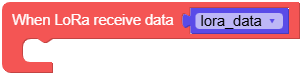
Set the interrupt callback function to be executed on IRQ.
- Parameters:
callback – The callback function to be invoked when the interrupt is triggered. The callback should not take any arguments and should return nothing.
Call start_recv() to begin receiving data.
UiFlow2 Code Block:
MicroPython Code Block:
lora_0.set_irq_callback()
- start_recv()
Start receive data.
This method initiates the process to begin receiving data.
UiFlow2 Code Block:

MicroPython Code Block:
lora_0.start_recv()
- recv(self, timeout_ms, rx_length, rx_packet)
Receive data.
- Parameters:
- Returns:
Received packet instance
- Return type:
Attempt to receive a LoRa packet. Returns None if timeout occurs, or returns the received packet instance.
UiFlow2 Code Block:

MicroPython Code Block:
data = lora_0.recv()
- send(buf, tx_at_ms=None)
Send data.
- Parameters:
- Returns:
Returns a timestamp (result of time.ticks_ms()) indicating when the data packet was sent.
- Return type:
Send a data packet and return the timestamp after the packet is sent.
UiFlow2 Code Block:

MicroPython Code Block:
lora_0.send()
- standby()
Set module to standby mode.
Puts the LoRa module into standby mode, consuming less power.
UiFlow2 Code Block:

MicroPython Code Block:
lora_0.standby()
- sleep()
Put the module to sleep mode.
Reduces the power consumption by putting the module into deep sleep mode.
UiFlow2 Code Block:

MicroPython Code Block:
lora_0.sleep()

Refer to class RxPacket for more details about RxPacket.