UDP Client
UiFlow2 Example
simple client
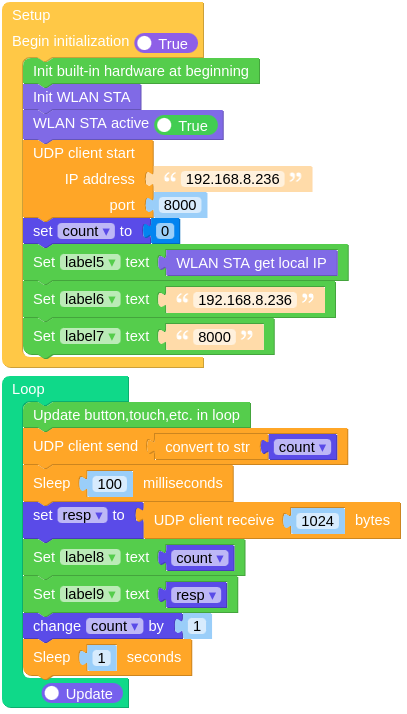
Open the cores3_udp_client_example.m5f2 project in UiFlow2.
This example creates a UDP client that sends data to a server.
UiFlow2 Code Block:
Example output:
None
MicroPython Example
sample client
This example creates a UDP client that sends data to a server.
MicroPython Code Block:
  1# SPDX-FileCopyrightText: 2025 M5Stack Technology CO LTD
  2#
  3# SPDX-License-Identifier: MIT
  4
  5import os, sys, io
  6import M5
  7from M5 import *
  8import network
  9import socket
 10import time
 11
 12
 13title0 = None
 14label0 = None
 15label1 = None
 16label2 = None
 17label3 = None
 18label4 = None
 19label5 = None
 20label6 = None
 21label7 = None
 22label8 = None
 23label9 = None
 24wlan = None
 25udpc = None
 26
 27
 28count = None
 29resp = None
 30
 31
 32def setup():
 33    global \
 34        title0, \
 35        label0, \
 36        label1, \
 37        label2, \
 38        label3, \
 39        label4, \
 40        label5, \
 41        label6, \
 42        label7, \
 43        label8, \
 44        label9, \
 45        wlan, \
 46        udpc, \
 47        count, \
 48        resp
 49
 50    M5.begin()
 51    Widgets.fillScreen(0x222222)
 52    title0 = Widgets.Title("UDP Clinet", 3, 0xFFFFFF, 0x0000FF, Widgets.FONTS.DejaVu24)
 53    label0 = Widgets.Label("Local IP:", 4, 32, 1.0, 0xFFFFFF, 0x222222, Widgets.FONTS.DejaVu18)
 54    label1 = Widgets.Label("Server IP:", 4, 60, 1.0, 0xFFFFFF, 0x222222, Widgets.FONTS.DejaVu18)
 55    label2 = Widgets.Label("Server Port:", 4, 88, 1.0, 0xFFFFFF, 0x222222, Widgets.FONTS.DejaVu18)
 56    label3 = Widgets.Label("Send:", 4, 116, 1.0, 0xFFFFFF, 0x222222, Widgets.FONTS.DejaVu18)
 57    label4 = Widgets.Label("Recv:", 4, 144, 1.0, 0xFFFFFF, 0x222222, Widgets.FONTS.DejaVu18)
 58    label5 = Widgets.Label("label5", 136, 32, 1.0, 0xFFFFFF, 0x222222, Widgets.FONTS.DejaVu18)
 59    label6 = Widgets.Label("label6", 136, 60, 1.0, 0xFFFFFF, 0x222222, Widgets.FONTS.DejaVu18)
 60    label7 = Widgets.Label("label7", 136, 88, 1.0, 0xFFFFFF, 0x222222, Widgets.FONTS.DejaVu18)
 61    label8 = Widgets.Label("label8", 136, 118, 1.0, 0xFFFFFF, 0x222222, Widgets.FONTS.DejaVu18)
 62    label9 = Widgets.Label("label9", 136, 144, 1.0, 0xFFFFFF, 0x222222, Widgets.FONTS.DejaVu18)
 63
 64    wlan = network.WLAN(network.STA_IF)
 65    wlan.active(True)
 66    udpc = socket.socket(socket.AF_INET, socket.SOCK_DGRAM)
 67    udpc.connect(("192.168.8.236", 8000))
 68    count = 0
 69    label5.setText(str(wlan.ifconfig()[0]))
 70    label6.setText(str("192.168.8.236"))
 71    label7.setText(str("8000"))
 72
 73
 74def loop():
 75    global \
 76        title0, \
 77        label0, \
 78        label1, \
 79        label2, \
 80        label3, \
 81        label4, \
 82        label5, \
 83        label6, \
 84        label7, \
 85        label8, \
 86        label9, \
 87        wlan, \
 88        udpc, \
 89        count, \
 90        resp
 91    M5.update()
 92    udpc.send(str(count))
 93    time.sleep_ms(100)
 94    resp = udpc.recv(1024)
 95    label8.setText(str(count))
 96    label9.setText(str(resp))
 97    count = (count if isinstance(count, (int, float)) else 0) + 1
 98    time.sleep(1)
 99
100
101if __name__ == "__main__":
102    try:
103        setup()
104        while True:
105            loop()
106    except (Exception, KeyboardInterrupt) as e:
107        try:
108            from utility import print_error_msg
109
110            print_error_msg(e)
111        except ImportError:
112            print("please update to latest firmware")
Example output:
None
API
- socket.socket()
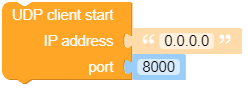
- socket.connect(address)
Create a socket object and connect to the server.
- Parameters:
address (tuple) – A tuple containing the server IP address and port number.
- Returns:
A socket object.
- Return type:
UiFlow2 Code Block:
MicroPython Code Block:
import socket

udpc = socket.socket(socket.AF_INET, socket.SOCK_DGRAM)
udpc.connect(('192.168.8.236', 8000))
- socket.close()
Close the socket connection.
UiFlow2 Code Block:

MicroPython Code Block:
udpc.close()
- socket.recv(bufsize)
Receive data from the socket.
- Parameters:
bufsize (int) – The maximum amount of data to be received at once.
- Returns:
The received data.
- Return type:
UiFlow2 Code Block:

MicroPython Code Block:
data = udpc.recv(1024)
print(data)
- socket.read()
Read data from the socket.
- Returns:
The received data.
- Return type:
UiFlow2 Code Block:

MicroPython Code Block:
data = udpc.read()
print(data)
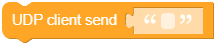
- socket.send(data)
Send data to the socket. The socket must be connected to a remote socket.
- Parameters:
- Returns:
The number of bytes sent.
- Return type:
UiFlow2 Code Block:
MicroPython Code Block:
udpc.send(b'Hello, World!')
udpc.send('Hello, World!')
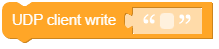
- socket.write(data)
Write the buffer of bytes to the socket. This function will try to write all data to a socket (no “short writes”). This may be not possible with a non-blocking socket though, and returned value will be less than the length of buf.
- Parameters:
- Returns:
The number of bytes sent.
- Return type:
UiFlow2 Code Block:
MicroPython Code Block:
udpc.write(b'Hello, World!')
udpc.write('Hello, World!')
- socket.setsockopt(level, optname, value)
Set the value of the given socket option. The needed symbolic constants are defined in the socket module (SO_* etc.). The value can be an integer or a bytes-like object representing a buffer.
- Parameters:
UiFlow2 Code Block:

MicroPython Code Block:
udpc.setsockopt(socket.SOL_SOCKET, socket.SO_REUSEADDR, 0)
udpc.setsockopt(socket.SOL_SOCKET, socket.SO_REUSEADDR, 1)