TCP Client
UiFlow2 Example
simple client
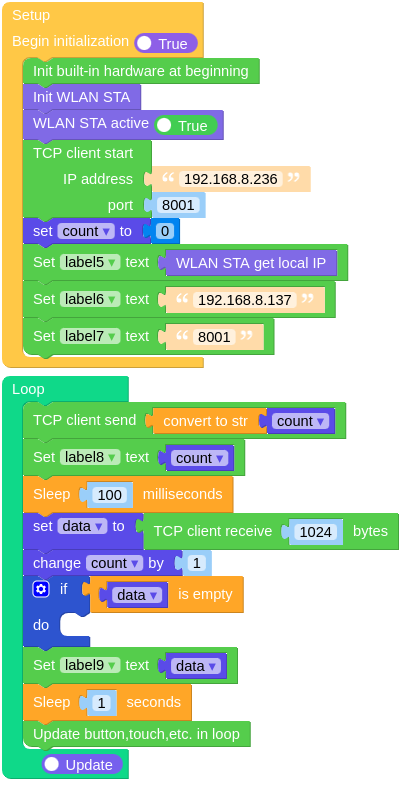
Open the cores3_tcp_client_example.m5f2 project in UiFlow2.
This example creates a TCP client that sends data to a server.
UiFlow2 Code Block:
Example output:
None
MicroPython Example
simple client
This example creates a TCP client that sends data to a server.
MicroPython Code Block:
  1# SPDX-FileCopyrightText: 2025 M5Stack Technology CO LTD
  2#
  3# SPDX-License-Identifier: MIT
  4
  5import os, sys, io
  6import M5
  7from M5 import *
  8import socket
  9import network
 10import time
 11
 12
 13title0 = None
 14label0 = None
 15label1 = None
 16label2 = None
 17label3 = None
 18label4 = None
 19label5 = None
 20label6 = None
 21label7 = None
 22label8 = None
 23label9 = None
 24tcpc = None
 25wlan = None
 26
 27
 28count = None
 29data = None
 30
 31
 32def setup():
 33    global \
 34        title0, \
 35        label0, \
 36        label1, \
 37        label2, \
 38        label3, \
 39        label4, \
 40        label5, \
 41        label6, \
 42        label7, \
 43        label8, \
 44        label9, \
 45        tcpc, \
 46        wlan, \
 47        count, \
 48        data
 49
 50    M5.begin()
 51    Widgets.fillScreen(0x222222)
 52    title0 = Widgets.Title("TCP Client", 3, 0xFFFFFF, 0x0000FF, Widgets.FONTS.DejaVu24)
 53    label0 = Widgets.Label("Local IP:", 4, 32, 1.0, 0xFFFFFF, 0x222222, Widgets.FONTS.DejaVu18)
 54    label1 = Widgets.Label("Server IP:", 4, 60, 1.0, 0xFFFFFF, 0x222222, Widgets.FONTS.DejaVu18)
 55    label2 = Widgets.Label("Server Port", 4, 88, 1.0, 0xFFFFFF, 0x222222, Widgets.FONTS.DejaVu18)
 56    label3 = Widgets.Label("Send:", 4, 118, 1.0, 0xFFFFFF, 0x222222, Widgets.FONTS.DejaVu18)
 57    label4 = Widgets.Label("Recv:", 4, 144, 1.0, 0xFFFFFF, 0x222222, Widgets.FONTS.DejaVu18)
 58    label5 = Widgets.Label("label5", 136, 32, 1.0, 0xFFFFFF, 0x222222, Widgets.FONTS.DejaVu18)
 59    label6 = Widgets.Label("label6", 136, 60, 1.0, 0xFFFFFF, 0x222222, Widgets.FONTS.DejaVu18)
 60    label7 = Widgets.Label("label7", 136, 88, 1.0, 0xFFFFFF, 0x222222, Widgets.FONTS.DejaVu18)
 61    label8 = Widgets.Label("label8", 136, 118, 1.0, 0xFFFFFF, 0x222222, Widgets.FONTS.DejaVu18)
 62    label9 = Widgets.Label("label9", 136, 144, 1.0, 0xFFFFFF, 0x222222, Widgets.FONTS.DejaVu18)
 63
 64    wlan = network.WLAN(network.STA_IF)
 65    wlan.active(True)
 66    tcpc = socket.socket(socket.AF_INET, socket.SOCK_STREAM)
 67    tcpc.connect(("192.168.8.236", 8001))
 68    count = 0
 69    label5.setText(str(wlan.ifconfig()[0]))
 70    label6.setText(str("192.168.8.137"))
 71    label7.setText(str("8001"))
 72
 73
 74def loop():
 75    global \
 76        title0, \
 77        label0, \
 78        label1, \
 79        label2, \
 80        label3, \
 81        label4, \
 82        label5, \
 83        label6, \
 84        label7, \
 85        label8, \
 86        label9, \
 87        tcpc, \
 88        wlan, \
 89        count, \
 90        data
 91    tcpc.send(str(count))
 92    label8.setText(str(count))
 93    time.sleep_ms(100)
 94    data = tcpc.recv(1024)
 95    count = (count if isinstance(count, (int, float)) else 0) + 1
 96    if not len(data):
 97        pass
 98    label9.setText(str(data))
 99    time.sleep(1)
100    M5.update()
101
102
103if __name__ == "__main__":
104    try:
105        setup()
106        while True:
107            loop()
108    except (Exception, KeyboardInterrupt) as e:
109        try:
110            from utility import print_error_msg
111
112            print_error_msg(e)
113        except ImportError:
114            print("please update to latest firmware")
Example output:
None
API
- socket.socket()
- socket.connect(address)
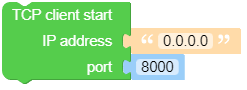
Create a socket object and connect to the server.
- Parameters:
address (tuple) – A tuple containing the server IP address and port number.
- Returns:
A socket object.
- Return type:
UiFlow2 Code Block:
MicroPython Code Block:
import socket

tcpc = socket.socket(socket.AF_INET, socket.SOCK_STREAM)
tcpc.connect(('192.168.8.236', 8001))
- socket.close()
Close the socket connection.
UiFlow2 Code Block:

MicroPython Code Block:
tcpc.close()
- socket.recv(bufsize)
Receive data from the socket.
- Parameters:
bufsize (int) – The maximum amount of data to be received at once.
- Returns:
The received data.
- Return type:
UiFlow2 Code Block:

MicroPython Code Block:
data = tcpc.recv(1024)
print(data)
- socket.read()
Read data from the socket.
- Returns:
The received data.
- Return type:
UiFlow2 Code Block:

MicroPython Code Block:
data = tcpc.read()
print(data)
- socket.readline()
Read a line, ending in a newline character.
- Returns:
the line read.
- Return type:
UiFlow2 Code Block:

MicroPython Code Block:
data = tcpc.readline()
print(data)
- socket.send(data)
Send data to the socket. The socket must be connected to a remote socket.
- Parameters:
- Returns:
The number of bytes sent.
- Return type:
UiFlow2 Code Block:

MicroPython Code Block:
tcpc.send(b'Hello, World!')
tcpc.send('Hello, World!')
- socket.write(data)
Write the buffer of bytes to the socket. This function will try to write all data to a socket (no “short writes”). This may be not possible with a non-blocking socket though, and returned value will be less than the length of buf.
- Parameters:
- Returns:
The number of bytes sent.
- Return type:
UiFlow2 Code Block:

MicroPython Code Block:
tcpc.write(b'Hello, World!')
tcpc.write('Hello, World!')
- socket.setblocking(flag)
Set blocking or non-blocking mode of the socket: if flag is false, the socket is set to non-blocking, else to blocking mode.
This method is a shorthand for certain settimeout() calls:
sock.setblocking(True)is equivalent tosock.settimeout(None)sock.setblocking(False)is equivalent tosock.settimeout(0)
- param bool flag:
If True, the socket will be in blocking mode. If False, the socket will be in non-blocking mode.
- return:
None
- rtype:
None
UiFlow2 Code Block:

MicroPython Code Block:
tcpc.setblocking(True)
tcpc.setblocking(False)
- socket.settimeout(timeout)
Set a timeout on blocking socket operations. The value argument can be a nonnegative floating point number expressing seconds, or None. If a non-zero value is given, subsequent socket operations will raise an OSError exception if the timeout period value has elapsed before the operation has completed. If zero is given, the socket is put in non-blocking mode. If None is given, the socket is put in blocking mode.
- Parameters:
timeout (float) – The timeout value in seconds. If None, the socket is put in blocking mode.
- Returns:
None
- Return type:
None
UiFlow2 Code Block:

MicroPython Code Block:
tcpc.settimeout(5)
tcpc.settimeout(None)